Beyond Code and Clicks: UX Insights to Security Software
Hon Kwok, Miccah
BSidesSF 2024 · Day 1
Overview
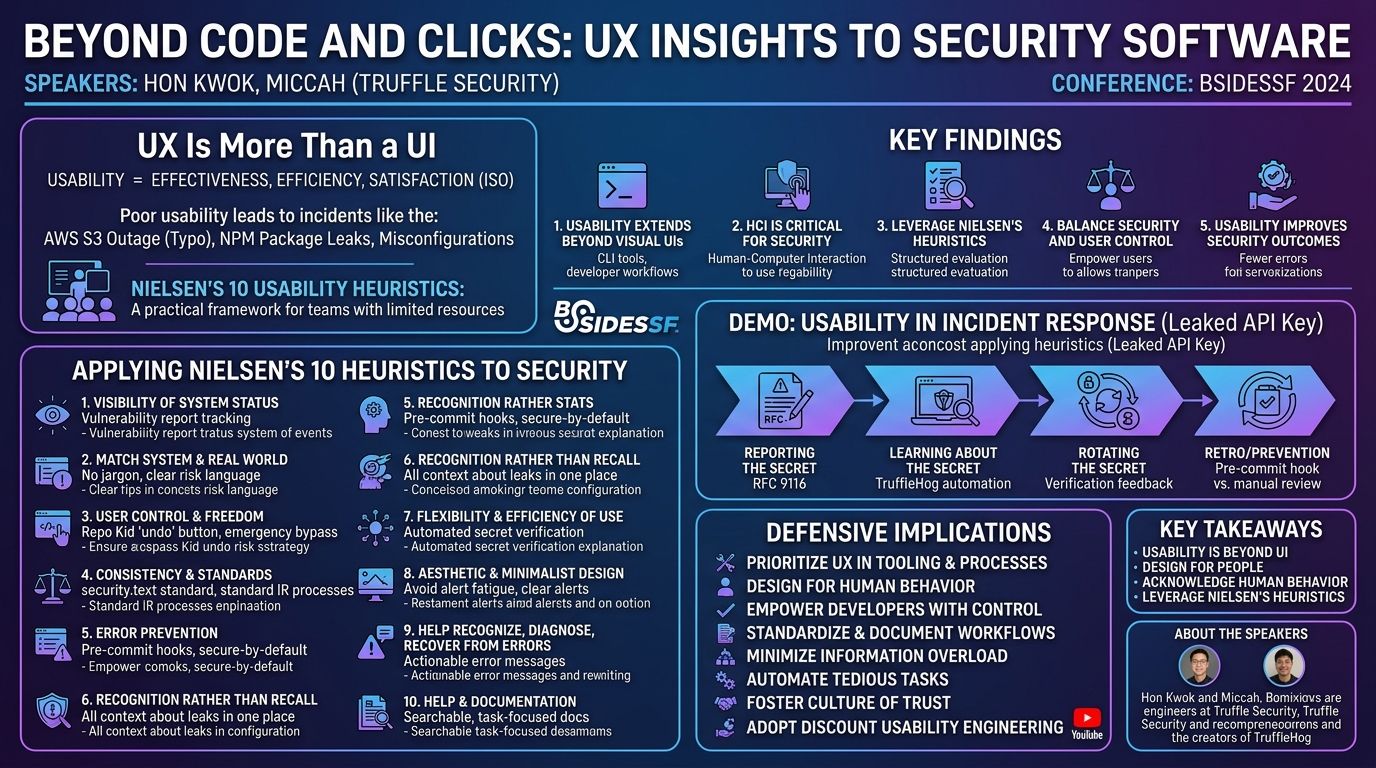
In their BSidesSF 2024 talk, "Beyond Code and Clicks: UX Insights to Security Software," Hon Kwok and Miccah, engineers at Truffle Security, presented a compelling argument for integrating user experience (UX) principles into security software and processes. Moving beyond the traditional focus on visual user interfaces, the speakers emphasized that UX encompasses the entire interaction between humans and technology, including command-line tools, developer workflows, and incident response procedures. Their presentation aimed to provide a leaner, more general perspective on how security teams, often operating with limited resources, can leverage UX practices to improve the effectiveness, efficiency, and satisfaction of their security solutions.
Key moments
- 00:00 Real-world Usability Failures
- 03:00 Usability Beyond Visuals
- 04:00 CLI Usability: Fisk vs. CFdisk
- 07:00 Institutional UX: Repo Kid vs. Murderbot
- 10:00 Nielsen's 10 Usability Heuristics
- 16:00 Heuristics in Incident Response
- 24:00 Pre-commit Hooks for Prevention
Beyond Code and Clicks: UX Insights to Security Software
Speakers: Hon Kwok, Miccah
Conference: BSidesSF 2024
YouTube: https://www.youtube.com/watch?v=_4R0-REfhj8
Overview
In their BSidesSF 2024 talk, "Beyond Code and Clicks: UX Insights to Security Software," Hon Kwok and Miccah, engineers at Truffle Security, presented a compelling argument for integrating user experience (UX) principles into security software and processes. Moving beyond the traditional focus on visual user interfaces, the speakers emphasized that UX encompasses the entire interaction between humans and technology, including command-line tools, developer workflows, and incident response procedures. Their presentation aimed to provide a leaner, more general perspective on how security teams, often operating with limited resources, can leverage UX practices to improve the effectiveness, efficiency, and satisfaction of their security solutions.
The talk highlighted that many significant security incidents and operational failures stem from human interaction with complex systems, often due to poor usability design. From incorrect command-line arguments leading to internet-wide outages to misconfigured cloud roles and leaked secrets, the human element is consistently a critical factor. Kwok and Miccah introduced Nielsen's 10 Usability Heuristics as a practical framework for security professionals to evaluate and enhance their systems, demonstrating how these principles apply not just to graphical interfaces but to code, processes, and overall security culture.
This article delves into the core arguments, technical details, and practical applications presented by Kwok and Miccah, offering insights into how security teams can adopt a user-centric approach to build more robust, intuitive, and resilient security programs. By reframing UX as a fundamental aspect of security engineering, the speakers provided a valuable roadmap for fostering better human-computer interaction in the security domain.
Background
▶ Watch: Real-world Usability Failures (00:00)
The genesis of this talk stems from Hon Kwok's prior experience and observations. Four years ago, Kwok delivered a talk at BSidesSF focusing on usability in security products, which, in retrospect, leaned heavily on visual UIs and assumed abundant resources for building them. Working at an early-stage startup like Truffle Security, an open-source company known for its secret scanning engine TruffleHog, provided a more realistic perspective on the resource constraints faced by many security teams. This led to the current presentation, which advocates for a broader, more general understanding of UX that extends beyond visual design to encompass processes and code.
The speakers opened with a series of real-world incidents illustrating the critical role of human interaction in security failures:
- AWS S3 Outage (7 years ago): An incorrectly entered command caused a larger-than-expected number of servers to go down in AWS S3 on US-East-1, leading to a widespread internet outage affecting services like GitHub, Docker, Square, and Twilio. This was attributed to a simple typo.
- NPM Package Leak: A developer added an
.npmignorefile without realizing it wasn't cumulative with an existing.gitignore, leading to sensitive files being leaked. - Kubernetes Role Misconfiguration: An infrastructure developer used a wildcard for Kubernetes verbs, expecting only API verbs like
get,patch, anddelete, but inadvertently granted access to Kubernetes-specific verbs likeescalate. - Linux Hard Drive Wipe: A Linux power user running Steam accidentally wiped their hard drive.
- AES GCM Misuse: An engineer misused AES GCM for encryption, making over 100 million phones vulnerable.
These diverse examples underscore a common thread: humans interacting with computers, whether through command-line arguments, package updates, or application usage. This highlights the pervasive nature of usability and developer experience (DX) in security.
Miccah, a backend engineer at Truffle Security who "loves the terminal and keyboard-driven UIs," and Hon, who is "very into the visual design side of things," defined usability according to the ISO definition: "effectiveness, efficiency, and satisfaction." They explicitly noted that visual design and aesthetics, while influential, are not the core of this definition.
They further illustrated the concept with a comparison of two terminal tools for formatting hard drives:
- Fisk: A command-line tool described as "terrifying" due to its lack of feedback. It executes destructive operations without warning, making a typo potentially catastrophic.
- CFdisk: An interactive text-based UI wrapper around Fisk. It provides an interactive component, shows the current system state, offers a list of options (reducing memory burden), and includes confirmation prompts and warnings (e.g., "device is currently in use"). This makes it significantly more usable despite performing the same function.
This comparison demonstrated that even within the terminal environment, application design profoundly impacts user experience. The speakers also introduced the concept of Human-Computer Interaction (HCI) as an academic field studying humans and computers, with UX being its practical implementation side, drawing parallels to security research and security engineering. They emphasized the importance of designing for people, acknowledging that human behavior introduces fuzziness that code alone cannot fully control.
A key anecdote shared was the evolution of least privilege provisioning tools at Netflix:
- Repo Man: An initial project where users would manually go to a dashboard, find their project, and click a button to apply least privilege roles. It suffered from low adoption, becoming "another dashboard in the background of a million other dashboards."
- Murderbot: A subsequent, more heavy-handed approach by another company that automatically terminated instances if not configured correctly. This led to significant apprehension among developers and a negative security culture.
- Repo Kid: Netflix's successful iteration. It identified projects with vulnerable permissions and fixed them automatically but provided an "undo" or "restore" button, giving developers an "out" if something broke. This clever solution addressed low-hanging fruit while identifying projects needing more security handholding, fostering a better security culture. This example perfectly illustrates the balance between security enforcement and user control, a core UX principle.
These foundational examples set the stage for introducing Discount Usability Engineering, a concept coined by Jakob Nielsen in 1989, which breaks down usability engineering into user testing, prototypes, and heuristic evaluations. The talk focused specifically on the latter, using Nielsen's 10 Usability Heuristics as a practical framework.
Key Findings
▶ Watch: CLI Usability: Fisk vs. CFdisk (04:00)
The central findings of this talk revolve around redefining and operationalizing user experience within the security domain, particularly for teams with limited resources.
- Usability Extends Beyond Visual UIs: The most significant finding is the assertion that UX is not solely about graphical interfaces. It encompasses the "effectiveness, efficiency, and satisfaction" of interactive systems, applying equally to command-line tools, APIs, developer workflows, and incident response processes. This broader definition allows security teams to integrate UX principles into every facet of their operations, from code to culture.
- Human-Computer Interaction (HCI) is Critical for Security: Many security incidents and operational inefficiencies stem from poor human-computer interaction. By acknowledging that "your users are human" and designing for people, security professionals can create systems that are less prone to human error and more intuitive to use. The examples of the AWS S3 outage, npm package leaks, and Kubernetes misconfigurations underscore this point.
- Nielsen's 10 Usability Heuristics as a Practical Framework: The talk introduces Nielsen's 10 Usability Heuristics as an accessible and powerful tool for "Discount Usability Engineering." These heuristics provide a structured way to evaluate and improve security software and processes without requiring extensive UX design resources. They are presented as guidelines rather than a rigid checklist, encouraging a mindset shift towards user-centric design.
- Balancing Security and User Control is Key: The "Repo Kid" example from Netflix demonstrates that effective security solutions empower users rather than alienate them. Providing mechanisms for user control and an "easy way out" (like an undo button) can significantly improve adoption and foster a positive security culture, even for automated enforcement mechanisms. This highlights the importance of User Control and Freedom (Heuristic 3).
- Usability Improves Security Outcomes: By applying UX principles, security teams can design more robust systems that prevent errors, streamline incident response, and enhance overall security posture. Proactive design, clear communication, and thoughtful error recovery mechanisms directly contribute to a more secure environment.
Technical Deep Dive
▶ Watch: Institutional UX: Repo Kid vs. Murderbot (07:00)
The core technical contribution of this talk is the application of Nielsen's 10 Usability Heuristics to security software and processes. These heuristics, originally developed for evaluating user interfaces, are recontextualized to demonstrate their relevance across the entire spectrum of human-computer interaction in security.
Here's a breakdown of each heuristic and its security implications, as discussed by the speakers:
- Visibility of system status: Users should always know what is going on, through appropriate feedback within a reasonable time.
- Security Context: For a vulnerability disclosure, knowing if a report was received and is being looked at (e.g., confirmation emails, status updates). Slow or unresponsive security processes degrade trust.
- Example: A "Domino's Pizza tracker" for vulnerability reports.
- Match between the system and the real world: The system should speak the users' language, with words, phrases, and concepts familiar to the user, rather than system-oriented terms. Follow real-world conventions, making information appear in a natural and logical order.
- Security Context: Avoiding security jargon. Communicating risks and actions in terms that developers or business users understand.
- Example: A calculator app that looks and acts like a physical calculator.
- User control and freedom: Users often choose system functions by mistake and will need a clearly marked "emergency exit" to leave the unwanted state without extended dialogue. Support undo and redo.
- Security Context: Giving developers an "out" or an "undo" button for automated security fixes (e.g., Repo Kid). Allowing users to bypass security checks in emergencies (e.g., disabling a pre-commit hook).
- Example: The contrast between "Repo Man" (no control), "Murderbot" (no control, punitive), and "Repo Kid" (control with an undo option).
- Consistency and standards: Users should not have to wonder whether different words, situations, or actions mean the same thing. Follow platform conventions.
- Security Context: Standardized methods for contacting security (e.g., RFC 9116 for
security.text). Consistent naming conventions for secrets (e.g., prefixing secrets). Following industry-standard processes for incident response. - Example: The universal understanding of a "hamburger menu" or the standard format of a
manpage for CLI tools.
- Error prevention: Even better than good error messages is a careful design that prevents a problem from occurring in the first place.
- Security Context: This is a core tenet of security: security guardrails, secure by default, secure by design. Implementing pre-commit hooks to catch secrets before they are committed.
- Example: A pre-commit hook preventing a secret from being committed, rather than detecting it after the fact.
- Recognition rather than recall: Minimize the user's memory load by making objects, actions, and options visible. The user should not have to remember information from one part of the dialogue to another. Instructions for use of the system should be visible or easily retrievable whenever appropriate.
- Security Context: Providing all necessary context about a leaked secret in one place, rather than requiring users to search through email threads or documentation. Minimizing the number of items a user needs to remember (referencing Miller's Law about holding roughly seven items in working memory).
- Example: An automated tool like TruffleHog providing all metadata about a secret instantly.
- Flexibility and efficiency of use: Accelerators — unseen by the novice user — may often speed up the interaction for the expert user such that the system can cater to both inexperienced and experienced users. Allow users to tailor frequent actions.
- Security Context: Providing automated tools to quickly research and verify secrets (e.g., TruffleHog). Standardized processes for common security tasks (e.g., secret rotation) that become efficient for repeated use. Functions in code as an analogy for efficiency.
- Example: An automated tool quickly verifying a secret's activity, saving manual research time.
- Aesthetic and minimalist design: Dialogues should not contain information that is irrelevant or rarely needed. Every extra unit of information in a dialogue competes with the relevant units of information and diminishes their relative visibility.
- Security Context: Avoiding information overload, especially during high-stress incidents. Presenting only relevant information about a security alert to prevent alert fatigue.
- Example: A dashboard showing only critical information about a secret, not every single detail.
- Help users recognize, diagnose, and recover from errors: Error messages should be expressed in plain language (no codes), precisely indicate the problem, and constructively suggest a solution.
- Security Context: Clear, actionable error messages from security tools (e.g., a pre-commit hook telling an engineer exactly what secret was found and how to fix it). Post-mortems for security incidents (e.g., Amazon adding the "five whys" after the S3 outage).
- Example: A pre-commit hook not just failing, but explaining why it failed and how to resolve the issue.
- Help and documentation: Even though it is better if the system can be used without documentation, it may be necessary to provide help and documentation. Any such information should be easy to search, focused on the user's task, list concrete steps to be carried out, and not be too large.
- Security Context: Providing clear, accessible documentation for security tools, processes, and incident response guidelines. This is especially crucial in high-stress environments.
- Example: Comprehensive, task-oriented documentation for rotating a secret or using a security tool.
The speakers emphasized that these heuristics are not a checklist but a framework for thinking about design. They also referenced Dr. Shana Daly's 77 heuristics for engineering design and creativity, highlighting the scientific literature supporting the use of heuristics in improving design ideation. The core message is that usability thinking applies to more than just visual UIs, extending to the entire engineering process.
Demo / Proof of Concept
▶ Watch: Heuristics in Incident Response (16:00)
Instead of a live code demonstration, Kwok and Miccah presented a story-based demonstration in the form of a common security incident: a leaked API key. They walked through the entire incident response process, applying Nielsen's 10 Usability Heuristics at each stage to illustrate how a user-centric approach can improve the effectiveness, efficiency, and satisfaction of security workflows.
The scenario unfolded in four main stages:
- Reporting the Secret:
- Initial State: A random email informs the team of an exposed AWS secret. Questions arise: Is it real? Is it ours? Who owns it? Do we start a Sev?
- Usability Application:
- Visibility of system status (Heuristic 1): How does the reporter know the company received the report? Are
security@inboxes monitored? This led to discussing RFC 9116 (security.text) as a standard way to enumerate security contact methods, providing clear status. - Consistency and standards (Heuristic 4):
security.textprovides a consistent method of contact. - Error prevention (Heuristic 5): Proactively providing clear contact methods prevents reporters from sending emails "into the void."
- Flexibility and efficiency of use (Heuristic 7): Streamlined disclosure processes.
- Help users recognize, diagnose, and recover from errors (Heuristic 9) & Help and documentation (Heuristic 10): Implicitly improved by clear disclosure pathways.
- Improvement: Structured disclosure forms could gather essential information (process, impact) upfront, improving efficiency.
- Learning About the Secret:
- Initial State: The "naive approach" involves manually researching the secret: going to AWS UI, searching docs for
curlrequests to verify activity, visiting various websites for information. This is tedious, error-prone, and inefficient. - Usability Application:
- Flexibility and efficiency of use (Heuristic 7): The naive approach suffers from inefficiency. An automated tool like TruffleHog can automatically scan, verify activity, and gather metadata, significantly improving efficiency.
- Recognition rather than recall (Heuristic 6): Having all context and information about the secret in one place (e.g., from an automated tool) minimizes memory burden and speeds up the process, especially in a high-stress, time-sensitive event.
- Consistency and standards (Heuristic 4): Having guidelines on how to approach the situation minimizes stress by providing a "paved road."
- Aesthetic and minimalist design (Heuristic 8): Only showing relevant information prevents overload.
- Help and documentation (Heuristic 10): Readily available documentation is crucial in high-stress environments.
- Rotating the Secret:
- Initial State: After rotation, the question remains: "Is the secret live still?" Trust but verify.
- Usability Application:
- Visibility of system status (Heuristic 1): How do we verify the secret is no longer active? This requires clear feedback.
- Flexibility and efficiency of use (Heuristic 7): If this is done multiple times, it needs to be quick.
- Consistency and standards (Heuristic 4): There's often an industry-standard process for secret rotation. The speakers noted Yob's Law (most people spend their time doing other things, so designs should follow similar patterns) to emphasize the importance of following established patterns.
- Help users recognize, diagnose, and recover from errors (Heuristic 9) & Help and documentation (Heuristic 10): A known, documented path for rotation aids recovery and understanding.
- Retro Items / Prevention:
- Initial State: A common, heavy-handed action item: adding the security team as a reviewer to all code changes.
- Usability Application (Critique of "Security Team as Reviewer"):
- User control and freedom (Heuristic 3): Gives all control to the security team, disempowering code owners.
- Flexibility and efficiency of use (Heuristic 7): One team blocking all changes drastically slows down efficiency.
- Help users recognize, diagnose, and recover from errors (Heuristic 9): An opaque process where engineers aren't empowered to learn and prevent issues themselves.
- Proposed Improvement (Pre-commit Hook):
- User control and freedom (Heuristic 3): Engineers can disable it if needed (local check, good for emergencies), providing an "out."
- Flexibility and efficiency of use (Heuristic 7): Automated, much faster than manual review.
- Help users recognize, diagnose, and recover from errors (Heuristic 9): Runs on the engineer's machine, directly tells them the problem, empowering them to learn and fix it.
- Error prevention (Heuristic 5): Catches secrets before they are committed.
This detailed walkthrough of a common security incident effectively demonstrated how applying usability heuristics at each stage can transform a reactive, inefficient, and potentially frustrating process into a proactive, efficient, and empowering one.
Defensive Implications
▶ Watch: Pre-commit Hooks for Prevention (24:00)
The insights from "Beyond Code and Clicks" offer several critical defensive implications for security teams looking to enhance their posture and operational efficiency:
- Prioritize Usability in Security Tooling and Processes: Security teams should actively evaluate their existing tools and incident response workflows through a UX lens. This means asking: Are our tools effective, efficient, and satisfying to use? Do they provide clear feedback? Do they minimize cognitive load? This applies to everything from vulnerability scanners and SIEMs to internal scripts and documentation.
- Design for Human Behavior and Error Prevention: Acknowledge that humans make mistakes. Implement security guardrails, secure by default, and secure by design principles that proactively prevent common errors. For instance, using pre-commit hooks to catch secrets before they enter repositories is a direct application of Error Prevention (Heuristic 5) that empowers developers at the earliest stage.
- Empower Developers with Control and Clear Feedback: Avoid "murderbot" approaches that alienate developers. Instead, emulate "Repo Kid" by providing automated security enforcement with clear "undo" mechanisms or options for bypass in emergencies. This fosters a collaborative security culture and aligns with User Control and Freedom (Heuristic 3). When security tools provide feedback, it should be clear, actionable, and help users diagnose and recover from errors (Heuristic 9).
- Standardize and Document Security Workflows: Establish clear, consistent, and well-documented processes for common security tasks, such as vulnerability disclosure (RFC 9116 for
security.text), secret rotation, and incident response. This reduces cognitive burden, especially during high-stress situations, and aligns with Consistency and Standards (Heuristic 4) and Help and Documentation (Heuristic 10). - Minimize Information Overload: During security incidents, provide only the most relevant information to responders. Overloading teams with irrelevant alerts or data leads to alert fatigue and hinders effective response. This is a direct application of Aesthetic and Minimalist Design (Heuristic 8).
- Automate Tedious Tasks for Efficiency: Leverage automation for repetitive and error-prone tasks, such as secret verification and metadata gathering (e.g., using tools like TruffleHog). This improves Flexibility and Efficiency of Use (Heuristic 7) and allows security personnel to focus on more complex problems.
- Foster a Culture of Transparency and Trust: Ensure that security processes provide clear Visibility of System Status (Heuristic 1). When a vulnerability is reported, the reporter should know it's being handled. When a security fix is applied, its status should be clear. This builds trust and encourages engagement with the security team.
- Adopt Discount Usability Engineering: Security teams with limited resources can still significantly improve their systems by conducting heuristic evaluations using frameworks like Nielsen's 10 Heuristics. This provides a structured, cost-effective way to identify usability issues in existing tools and processes.
By integrating these defensive implications, security teams can move beyond merely enforcing security policies to designing security solutions that are inherently more usable, effective, and integrated into the daily workflows of their organizations.
Key Takeaways
- Usability thinking applies to more than just the UI: User experience encompasses processes, code, and human interaction across multiple systems, not just visual interfaces. Thinking about usability for an entire scenario can shape how security systems are designed.
- Design for people, not just "users": Acknowledge human behavior, emotions, and cognitive limitations when designing security software, tools, and processes. Dehumanizing the term "users" can lead to less empathetic and effective designs.
- Acknowledge human behavior and engineer safeguards: People interact with technology differently and will occasionally make mistakes. Setting up guardrails and secure-by-default configurations helps guide users towards the best course of action and prevents errors.
- Leverage Nielsen's 10 Heuristics for DIY usability engineering: These 10 straightforward heuristics provide a practical and accessible framework for security teams to conduct "discount usability engineering," evaluating and improving their systems without extensive dedicated UX resources.
About the Speaker(s)
Hon Kwok and Miccah are engineers at Truffle Security, an open-source company known for its secret scanning engine, TruffleHog.
Miccah is a backend engineer at Truffle Security, expressing a strong preference for the terminal and keyboard-driven user interfaces.
Hon Kwok is also an engineer at Truffle Security, with a particular interest in the visual design side of things. Kwok previously gave a talk at BSidesSF four years prior, focusing on usability in security products, which has evolved into the broader perspective presented in this talk.
Reviews
Dr. Zero (Offensive Security Researcher) — STRONG ACCEPT
This session effectively argues that User Experience (UX) extends far beyond graphical interfaces, profoundly impacting security processes and tools. By applying established usability heuristics, the speakers demonstrated how to design more effective, efficient, and satisfying security interactions, from command-line tools to incident response workflows. The talk provided concrete examples, such as the contrast between Fisk and CFdisk, and the institutional success of Repo Kid over "Murderbot," to illustrate how human-centered design can significantly reduce security risks and improve adoption.
Heather Calloway (CISO) — STRONG ACCEPT
This session provided a clear and compelling argument for integrating user experience principles into security software and processes, moving beyond superficial UI considerations. The speakers effectively demonstrated how poor usability directly contributes to significant security incidents and operational inefficiencies, using real-world examples like the AWS S3 outage and the "Murderbot" scenario. By applying Nielsen's heuristics to critical security workflows, the talk offered a practical framework for security leaders to design more resilient, user-friendly, and ultimately more effective security programs that account for human behavior and institutional realities.