TryHackMe - Azure Purple Teaming: Emulating and Detecting Cloud TTPs
Cloud Village @ DEF CON 33 · Day 1 · Cloud Village
Overview
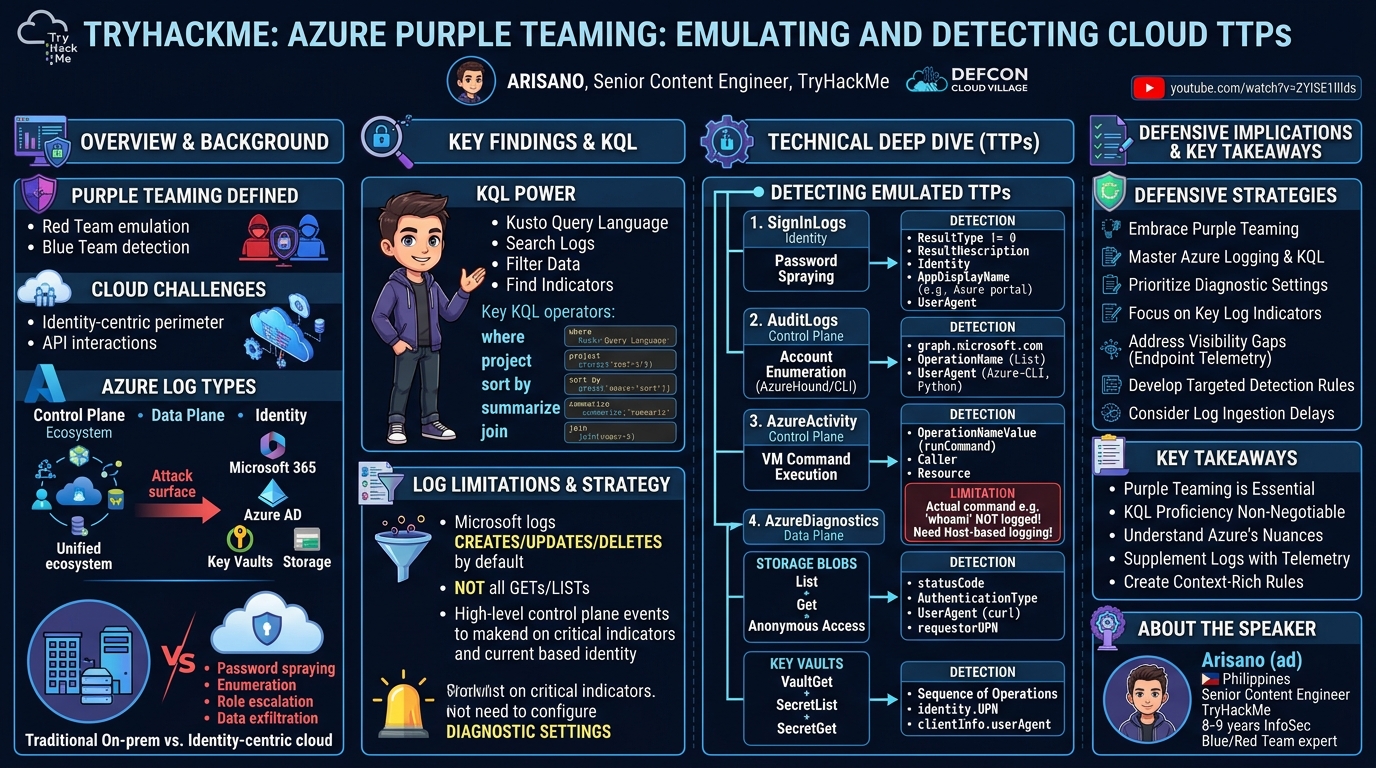
Arisano's talk at Cloud Village, titled "TryHackMe - Azure Purple Teaming: Emulating and Detecting Cloud TTPs," provided a hands-on workshop demonstrating the critical practice of purple teaming within Microsoft Azure environments. The session focused on bridging the gap between offensive and defensive security by actively emulating common attacker tactics, techniques, and procedures (TTPs) and then analyzing their visibility in Azure's logging infrastructure, primarily through Azure Sentinel and Kusto Query Language (KQL).
Key moments
- 0:00 Workshop setup: Joining the TryHackMe room
- 4:00 Speaker introduction and workshop agenda
- 4:30 Defining purple teaming and its collaborative nature
- 7:00 Example purple teaming scenario and exercise outcomes
- 8:20 Why purple teaming is crucial for Azure environments
- 9:00 Overview of Azure components and potential attack vectors
TryHackMe - Azure Purple Teaming: Emulating and Detecting Cloud TTPs
Speakers: Arisano, Senior Content Engineer, TryHackMe
Conference: Cloud Village
YouTube: https://www.youtube.com/watch?v=ZYlSE1llIds
Overview
Arisano's talk at Cloud Village, titled "TryHackMe - Azure Purple Teaming: Emulating and Detecting Cloud TTPs," provided a hands-on workshop demonstrating the critical practice of purple teaming within Microsoft Azure environments. The session focused on bridging the gap between offensive and defensive security by actively emulating common attacker tactics, techniques, and procedures (TTPs) and then analyzing their visibility in Azure's logging infrastructure, primarily through Azure Sentinel and Kusto Query Language (KQL).
This talk is particularly significant for organizations heavily invested in Microsoft 365 and Azure AD tenants. As cloud adoption accelerates, the attack surface expands, shifting the security perimeter from traditional networks to identity and API interactions. Understanding how adversary actions manifest in Azure logs and establishing robust detection and response capabilities is paramount. Arisano's workshop offered a practical blueprint for security teams to enhance their cloud security posture by aligning red team emulation with blue team detection engineering.
The core value proposition of the talk lies in its practical approach to addressing the unique challenges of cloud security. It highlights that while Azure offers a unified ecosystem, it also introduces more potential attack vectors across its integrated services. By meticulously demonstrating how specific TTPs—ranging from credential brute-forcing and account enumeration to accessing sensitive data in Key Vaults and Storage Blobs—appear (or sometimes don't appear) in Azure logs, the workshop equipped participants with actionable insights to build more effective cloud detection strategies.
Background
▶ Watch: Workshop setup: Joining the TryHackMe room (0:00)
Purple teaming is a collaborative security practice where red team (offensive) and blue team (defensive) members work in tandem to test, validate, and improve an organization's security posture. Unlike traditional red team exercises, where the blue team is often unaware of the simulated attack, purple teaming involves planned coordination. Both sides align their actions, share intelligence on TTPs, and jointly analyze detection and response capabilities, ultimately enhancing visibility and refining detection rules. This collaborative feedback loop is crucial for continuous improvement of security operations.
The shift to cloud environments, particularly Microsoft Azure, introduces distinct challenges that make purple teaming even more critical. Organizations increasingly operate in the cloud, relying on Microsoft 365 and Azure AD for core services. While Azure offers a unified ecosystem, integrating numerous components like users, groups, service principals (Azure AD), emails, file storage (Microsoft 365), virtual machines, networks (Azure Compute), Key Vaults, and Storage Blobs, this integration simultaneously expands the potential attack surface. Each interconnected service presents new avenues for adversaries.
Traditional on-premise threat models, primarily focused on network perimeters and internal Active Directory accounts, often fall short in the cloud. In Azure, the security perimeter is largely identity-centric, revolving around user accounts, service principals, and the roles assigned to them. Interactions with Azure resources frequently occur directly through API endpoints rather than just user interfaces, necessitating a different approach to monitoring and detection. Common attack vectors in Azure include password spraying, account enumeration, and role escalation for Azure AD; phishing and token reuse for Microsoft 365; unauthorized access to VMs; exfiltration of secrets from Key Vaults; and data breaches from Storage Blobs.
Effective purple teaming in Azure requires a deep understanding of its logging capabilities and limitations. Azure categorizes events into three main types:
- Control Plane Events: These track management actions on Azure resources, such as creating a VM, configuring a Key Vault, or deploying a storage account. Similar to AWS CloudTrail, these logs capture actions performed within the Azure portal or via management APIs.
- Data Plane Events: Focused on data handling resources, these events log interactions with the actual data stored within services. For example, accessing a secret in a Key Vault or reading a file from a Storage Blob falls under data plane logging. These often require explicit configuration and provide granular detail about data access.
- Identity Events: Pertaining to user and account-related activities, these include sign-ins, user/group changes, and directory role modifications. These are fundamental for detecting compromise of identities, which are the primary control plane in Azure.
Despite these logging capabilities, Azure visibility has limitations. Microsoft does not log all GET and LIST operations by default, citing the sheer volume of data that would overwhelm logging infrastructure. This means that an attacker enumerating users or resources might not always leave a clear trace for every single query. Logging primarily focuses on CREATE, UPDATE, and DELETE actions, which are deemed more significant. Furthermore, some control plane events can be high-level, lacking the granular detail (e.g., specific command-line parameters for VM execution) needed for in-depth forensic analysis. Critically, diagnostic settings for many resources must be explicitly enabled and configured to route logs to destinations like Log Analytics Workspaces (for Azure Sentinel), Azure Storage Accounts, or Azure Event Hubs (for external SIEM integration). This necessitates a proactive and deliberate approach to logging configuration.
Key Findings
▶ Watch: Defining purple teaming and its collaborative nature (4:30)
The talk's key findings underscore the necessity of a structured approach to purple teaming in Azure, particularly in light of the platform's unique logging characteristics. The primary contribution is a practical demonstration of how to overcome Azure's logging limitations by focusing on specific log sources and identifying critical indicators within them. By emulating known TTPs, Arisano illustrated that while some actions might lack granular detail, others leave distinct footprints that, when combined with contextual information, can form robust detection rules.
A central finding is the paramount importance of Kusto Query Language (KQL) proficiency for Azure defenders. KQL serves as the primary tool for querying and analyzing the vast amounts of data ingested into Azure Sentinel's Log Analytics Workspaces. Without a strong grasp of KQL, effectively sifting through logs to identify malicious activity becomes an insurmountable task.
The workshop highlighted specific log sources and fields that are invaluable for detection:
SignInLogs: Critical for monitoring identity-related activities. Key fields likeresultDescription(indicating success or failure reasons),userAgent(revealing the client tool or browser),appDisplayName(showing the application or service being accessed, e.g., Azure Portal, Azure CLI, Azure PowerShell endpoint), andIPAddress(providing location context) are crucial for identifying unusual or malicious authentication attempts.AuditLogs(for Microsoft Graph activity): Essential for detecting enumeration activities. Thegraph.microsoft.comAPI endpoint is a strong indicator of tools like AzureHound or Azure CLI enumerating users, groups, or service principals. TheuserAgentin these logs can explicitly identify the client tool, such as "Azure-CLI" or "Python" for Azure CLI.AzureActivity: While logging VM command execution, a significant finding was the lack of detail for the actual command executed. This limitation necessitates supplementing Azure logs with host-based logging within the VM for comprehensive visibility. However, the presence of an execution event itself is a valuable alert.AzureDiagnostics(for Key Vault and Storage Blobs): These data plane logs provide highly verbose and granular information. For Storage Blobs,requestorUPN(identity),statusCode(e.g., 200/206 for success, 404 for anonymous access attempts),AuthenticationType(anonymous vs. authenticated), anduserAgent(e.g., curl) are key indicators. For Key Vaults, a sequence ofvaultGet,secretList, andsecretGetoperations, especially from unusualclientInfo(user agent) oridentity(UPN), signals sensitive secret access.
Ultimately, the talk demonstrated that despite inherent logging limitations, a strategic approach leveraging specific log sources and focused KQL queries can enable organizations to build effective detection rules for critical Azure TTPs. The emphasis on user agent analysis, API endpoint identification, and understanding the sequence of operations (e.g., list before get) emerged as fundamental principles for cloud defenders.
Technical Deep Dive
▶ Watch: Example purple teaming scenario and exercise outcomes (7:00)
The technical deep dive of the workshop centered on understanding Azure's logging mechanisms, particularly through Azure Sentinel and Kusto Query Language (KQL), and applying this knowledge to detect emulated attacker TTPs. The talk dissected various Azure log tables and their specific fields that are instrumental in identifying malicious activities.
Kusto Query Language (KQL)
KQL is Microsoft's powerful query language designed for querying large volumes of structured, semi-structured, and unstructured data. It's the backbone of data analysis in Azure Sentinel, allowing security analysts to efficiently retrieve and filter logs. Key KQL operators demonstrated included:
where: Filters records based on a predicate, similar to SQL'sWHEREclause.- Example:
SigninLogs | where ResultType != 0(filters for failed sign-ins). project: Selects specific columns to display, akin toSELECTin SQL.- Example:
SigninLogs | project TimeGenerated, Identity, AppDisplayName, IPAddress, UserAgent, ResultDescription sort by: Orders the results by one or more columns.- Example:
SigninLogs | sort by TimeGenerated desc(sorts by time, newest first). summarize: Aggregates data, useful for counting events or calculating statistics.join: Correlates data across different tables.
Azure Log Sources and TTP Detection
The workshop explored several critical Azure log tables, demonstrating how to query them for specific TTPs:
1. SignInLogs - Identity Events
This table captures all user authentication attempts, both successful and failed.
- Emulated TTP: Password spraying/failed login attempts against the
purpleteamuser, followed by a successful login. - Detection Indicators:
ResultType:0for successful logins, non-0for failures.ResultDescription: Provides specific reasons for authentication failures (e.g., "Invalid username or password"). This is highly significant for triage.Identity: The user principal name (UPN) of the account attempting to log in.AppDisplayName: Identifies the application or service used for authentication (e.g., "Azure portal," "Azure CLI," "Azure PowerShell"). Unusual app display names can indicate suspicious activity.IPAddress: The source IP address, crucial for geo-location analysis and identifying logins from unexpected locations.UserAgent: The client string, revealing the tool or browser used (e.g., "Mozilla/5.0," "Azure-CLI"). A non-browser user agent for a human user is highly suspicious.- KQL Example:
2. AuditLogs - Microsoft Graph Activity (Control Plane)
This table records activities related to Azure AD and Microsoft Graph API interactions.
- Emulated TTP: Account enumeration using AzureHound and Azure CLI (listing users, groups, service principals).
- Detection Indicators:
OperationName: Describes the action (e.g., "List users," "List groups").TargetResources: The specific resources being enumerated.CallerIpAddress: Source IP.UserAgent: Crucially identifies the enumeration tool. Azure CLI operations will show aUserAgentlike "Azure-CLI/2.x.x" often running on Python. AzureHound might have a distinct user agent.RequestUri: The API endpoint being hit. Enumeration tools frequently targetgraph.microsoft.comendpoints (e.g.,/users,/groups,/servicePrincipals).- KQL Example:
3. AzureActivity - VM Command Execution (Control Plane)
This table logs control plane actions on Azure resources, including VM operations.
- Emulated TTP: Remote command execution on an Azure VM.
- Detection Indicators:
OperationName: "RunCommand" or similar.Caller: The identity that initiated the command.Resource: The targeted VM.- Limitation: A critical finding was that the actual command executed (e.g.,
whoami) is NOT logged inAzureActivity. This highlights a significant visibility gap that requires external host-based logging on the VM itself (e.g., Sysmon, Linux auditd) to capture command-line details. - KQL Example (to find execution, not command detail):
4. AzureDiagnostics - Storage Blobs and Key Vaults (Data Plane)
This table collects resource-specific diagnostic logs, providing granular data plane activity.
- Emulated TTPs:
- Storage Blob Access: Listing containers, listing blobs, getting blob content (both anonymous and authenticated).
- Key Vault Secret Access: Listing vaults, listing secrets, getting a specific secret.
- Detection Indicators (Storage Blobs):
OperationName: "ListContainers," "ListBlobs," "GetBlob," etc.requestorUPN: The identity of the accessor.statusCode:200(OK),206(Partial Content) for success.404for anonymous access attempts to non-existent or private blobs can indicate enumeration.AuthenticationType: "Anonymous" for unauthenticated access. Monitoring this is crucial.UserAgent: Tools like curl will have a distinct user agent.uri: The specific blob or container URI.- Detection Indicators (Key Vaults):
OperationName: "VaultGet," "SecretList," "SecretGet." A sequence ofVaultGet->SecretList->SecretGetis a strong indicator of an attacker seeking and retrieving secrets.identity.UPN: The user accessing the Key Vault.clientInfo.userAgent: The client tool or application used. Key Vault access is often programmatic (SDKs, applications), so direct browser or unusual user agents are suspicious.resultType: "Success" or "Failure."- KQL Example (Storage Blob):
- KQL Example (Key Vault):
The deep dive reinforced that while Azure provides extensive logging, understanding its nuances, enabling appropriate diagnostic settings, and mastering KQL are non-negotiable for building effective cloud detection capabilities. The talk specifically highlighted that the userAgent field consistently provides critical context across various log sources, acting as a crucial indicator for identifying automated tools or unusual client interactions.
Demo / Proof of Concept
▶ Watch: Why purple teaming is crucial for Azure environments (8:20)
The core of Arisano's workshop was a hands-on lab environment hosted on TryHackMe, allowing participants to directly engage in Azure purple teaming. The demonstration involved a series of emulated attacker TTPs within a controlled Azure tenant, followed by real-time analysis of the generated logs in Azure Sentinel using Kusto Query Language (KQL).
Participants were provided with temporary Azure credentials to access a dedicated lab environment via portal.azure.com. The primary tool for log analysis was Azure Sentinel, accessed through a Log Analytics Workspace. The emulation activities were performed either directly through the Azure portal's user interface or via the Azure Cloud Shell, which provided a command-line interface for executing Azure CLI and PowerShell commands.
The lab was structured into several tasks, each focusing on a different TTP:
- Emulating Failed Login Attempts:
- Action: Participants attempted to log in as a designated
purpleteamuser multiple times with incorrect passwords using an incognito browser tab. This simulated a password spraying or brute-force attack. - Analysis: In Sentinel, participants queried the
SignInLogstable, filtering forResultType != 0(failed logins) and thepurpleteamuser. This revealed numerous failed login events, showcasing theResultDescription(e.g., "Invalid username or password"),IPAddress,UserAgent(browser string), andAppDisplayName("Azure portal"). The exercise demonstrated how to identify unusual login patterns and origins.
- Account Enumeration (AzureHound / Azure CLI):
- Action: After successfully logging in with their own lab accounts, participants used Azure CLI commands (or implicitly, a tool like AzureHound which leverages similar API calls) to enumerate users, groups, and service principals within the Azure AD tenant. This simulated reconnaissance activities.
- Analysis: Queries against the
AuditLogstable, specifically looking for operations targetinggraph.microsoft.comAPI endpoints (e.g.,/users,/groups) andOperationNamelike "List users," "List groups." The crucial indicator here was theUserAgentfield, which clearly identified the activity as originating from "Azure-CLI" or "Python" for Azure CLI, or a specific string for AzureHound. This showed how to detect automated enumeration tools.
- Storage Blob Access:
- Action: Participants interacted with an Azure Storage Account, performing actions like listing containers, listing blobs within a container, and attempting to retrieve the content of a blob. This included attempts to access both publicly exposed and private blobs, and anonymous vs. authenticated access. Tools like
curlwere used for some interactions. - Analysis: The
AzureDiagnosticstable (specificallyStorageBlobLogs) was queried. Key fields analyzed includedOperationName("ListContainers," "ListBlobs," "GetBlob"),requestorUPN(for authenticated access),statusCode(e.g.,200for success,404for unauthorized anonymous attempts),AuthenticationType("Anonymous" or "OAuth"), andUserAgent(e.g., "curl"). The demo highlighted how to differentiate legitimate access from suspicious enumeration or unauthorized retrieval, including the early warning signs ofListContainersorListBlobsoperations.
- VM Command Execution:
- Action: Participants executed a simple command (e.g.,
whoami) on a provisioned Azure Virtual Machine using Azure CLI's remote command execution capabilities. - Analysis: The
AzureActivitytable was queried forOperationNameValuecontaining "Microsoft.Compute/virtualMachines/runCommand/action." While the logs successfully showed that a command was executed on the target VM by a specific user from a specific IP, the critical demonstration point was the absence of the actual command string (whoami) in the Azure logs. This highlighted a significant visibility gap, emphasizing the need for supplementary host-based logging on the VM itself to capture such details.
- Key Vault Secret Access:
- Action: Participants listed Azure Key Vaults, then listed secrets within a specific Key Vault, and finally retrieved the value of a secret.
- Analysis: The
AzureDiagnosticstable (filtered forResourceType == "VAULTS") was used. The demo showed a sequence ofOperationNamevalues:VaultGet(listing the vault),SecretList(listing secrets within the vault), andSecretGet(retrieving a specific secret). Theidentity.UPNfield identified the accessor, andclientInfo.userAgentprovided context on the tool used. This illustrated how to detect the full lifecycle of secret exfiltration attempts, from reconnaissance to actual retrieval.
Throughout the demo, Arisano emphasized the delay in log ingestion into Sentinel, suggesting participants perform multiple emulation steps before reviewing logs in batches. This realistic observation underscored a practical challenge in cloud security operations. The hands-on nature of the workshop, combined with the detailed KQL queries and analysis, provided a powerful proof of concept for effective Azure purple teaming.
Defensive Implications
▶ Watch: Overview of Azure components and potential attack vectors (9:00)
Arisano's workshop provides several critical defensive implications for organizations securing their Azure environments. The exercises underscore that a proactive, collaborative approach is essential to building robust cloud security.
- Embrace Purple Teaming: The most fundamental implication is the necessity of adopting purple teaming as a standard practice for Azure. Simply relying on out-of-the-box detections or traditional red team assessments is insufficient. Active, coordinated emulation of TTPs with simultaneous blue team analysis is the most effective way to validate and mature detection and response capabilities in a dynamic cloud environment.
- Master Azure Logging and KQL: Defenders must develop a deep understanding of Azure's diverse logging sources (
SignInLogs,AuditLogs,AzureActivity,AzureDiagnostics) and their specific contents. Crucially, proficiency in Kusto Query Language (KQL) is non-negotiable for effectively querying, filtering, and analyzing these logs within Azure Sentinel. Without KQL expertise, the vast amount of cloud log data becomes an unmanageable haystack.
- Prioritize Diagnostic Settings Configuration: Many critical data plane logs (
AzureDiagnosticsfor Key Vaults, Storage Blobs, etc.) require explicit enablement of diagnostic settings to route them to a Log Analytics Workspace. Defenders must proactively identify all sensitive Azure resources and ensure their diagnostic settings are configured for comprehensive logging. This should be part of a robust cloud security posture management (CSPM) strategy.
- Focus on Key Log Indicators: The workshop highlighted specific fields that consistently provide high-fidelity indicators of compromise:
UserAgent: A powerful indicator acrossSignInLogs,AuditLogs, andAzureDiagnosticsto identify automated tools (Azure CLI, AzureHound, curl) or unusual client interactions (e.g., non-browser access for human users).AppDisplayName(inSignInLogs): Reveals the target service/application, helping distinguish legitimate from suspicious access points.RequestUri(inAuditLogs): Crucial for identifying enumeration activities targeting specific API endpoints likegraph.microsoft.com.ResultDescription(inSignInLogs): Provides specific reasons for authentication failures, aiding in distinguishing between user error and malicious brute-forcing.statusCodeandAuthenticationType(inAzureDiagnostics): Essential for detecting unauthorized or anonymous access attempts to data stores like Storage Blobs.OperationNamesequences (inAzureDiagnosticsfor Key Vaults): Observing a pattern ofVaultGet->SecretList->SecretGetis a strong indicator of an attacker systematically retrieving secrets.
- Address Visibility Gaps: The demonstration of VM command execution revealed a significant visibility gap: the actual command executed is not logged in
AzureActivity. Defenders must supplement Azure's native logs with host-based logging (e.g., Sysmon for Windows, auditd/osquery for Linux) within their Azure VMs to capture granular command-line details and other endpoint telemetry. These host logs should ideally be ingested into Sentinel for centralized analysis.
- Develop Targeted Detection Rules: Based on the observed TTPs and their log patterns, security teams should develop specific detection rules in Azure Sentinel. Examples include:
- Alerting on mass failed login attempts from unusual IPs or user agents.
- Detecting enumeration activities against
graph.microsoft.comwith suspicious user agents. - Flagging anonymous or unauthorized access attempts to sensitive Storage Blobs or Key Vaults.
- Alerting on remote command execution on VMs, even without command details, as an initial indicator for further investigation.
- Consider Log Ingestion Delays: The workshop highlighted that Azure log ingestion is not always real-time. Defenders should factor in potential ingestion delays when designing incident response playbooks and setting expectations for real-time alerting. Batch analysis and looking back over a slightly longer time window (e.g., 5-10 minutes) might be necessary.
By integrating these defensive implications, organizations can significantly enhance their ability to detect and respond to cloud-specific threats, moving beyond reactive security to a more proactive and resilient posture in Azure.
Key Takeaways
- Purple Teaming is Essential for Cloud Security: Collaborative emulation of TTPs by red and blue teams is critical to validate and improve Azure detection and response capabilities, given the unique attack surface.
- KQL Proficiency is Non-Negotiable: Mastering Kusto Query Language is fundamental for effectively analyzing the vast volumes of log data within Azure Sentinel and building robust detection queries.
- Understand Azure's Logging Nuances: Be aware of default logging limitations (e.g.,
GET/LISToperations, high-levelAzureActivityevents) and proactively configure diagnostic settings for sensitive resources to ensure comprehensive data plane logging. - Prioritize Specific Log Fields: Focus on
UserAgent,AppDisplayName,RequestUri,ResultDescription,statusCode,AuthenticationType, andrequestorUPNacrossSignInLogs,AuditLogs, andAzureDiagnosticsfor high-fidelity detection. - Supplement Cloud Logs with Endpoint Telemetry: For gaps like VM command execution details, integrate host-based logging (e.g., Sysmon) within Azure VMs and ingest these logs into Sentinel for a complete picture.
- Develop Context-Rich Detection Rules: Create specific Sentinel rules based on observed TTPs, correlating multiple log indicators (e.g., sequence of Key Vault operations, unusual user agents with enumeration patterns) to reduce false positives and enhance alert efficacy.
About the Speaker(s)
The workshop was led by Arisano, who introduced himself with the handle "ad." Arisano is from the Philippines and shared that this was his first time at Defcon. With 8-9 years of experience in the information security field, he currently serves as a Senior Content Engineer at TryHackMe. In this role, Arisano primarily focuses on developing blue team content, and he is also involved in creating CTF (Capture The Flag) content for the platform. Beyond his work at TryHackMe, Arisano is a red team consultant/manager, leading a team of red team facilitators in a consulting company in his home country. His diverse background in both offensive and defensive security, coupled with his experience in content creation, made him well-suited to deliver a practical purple teaming workshop.
Reviews
Dr. Zero (Offensive Security Researcher) — SOLID
Competent cloud security workshop covering Azure purple teaming fundamentals — SignInLogs, AuditLogs, AzureActivity, AzureDiagnostics, KQL queries for common TTPs. Honest about logging gaps (VM command execution blind spot is worth noting). Nothing here that a motivated defender couldn't find in Microsoft's own documentation or existing Azure security blogs, and the speaker's TryHackMe affiliation means this is partly a platform advertisement dressed as a workshop.
Heather Calloway (CISO) — SOLID
A technically competent workshop on Azure purple teaming that delivers real hands-on value for detection engineers learning the platform. Useful, executable, and honest about Azure's logging gaps — but it stops at the practitioner layer and never surfaces the institutional questions that make those gaps matter.