Abusing Windows Hello Without a Severed Hand
Ceri Coburn, Dirk jan Mollema
DEF CON 32 Main Stage · Day 1 · Main Stage
Overview
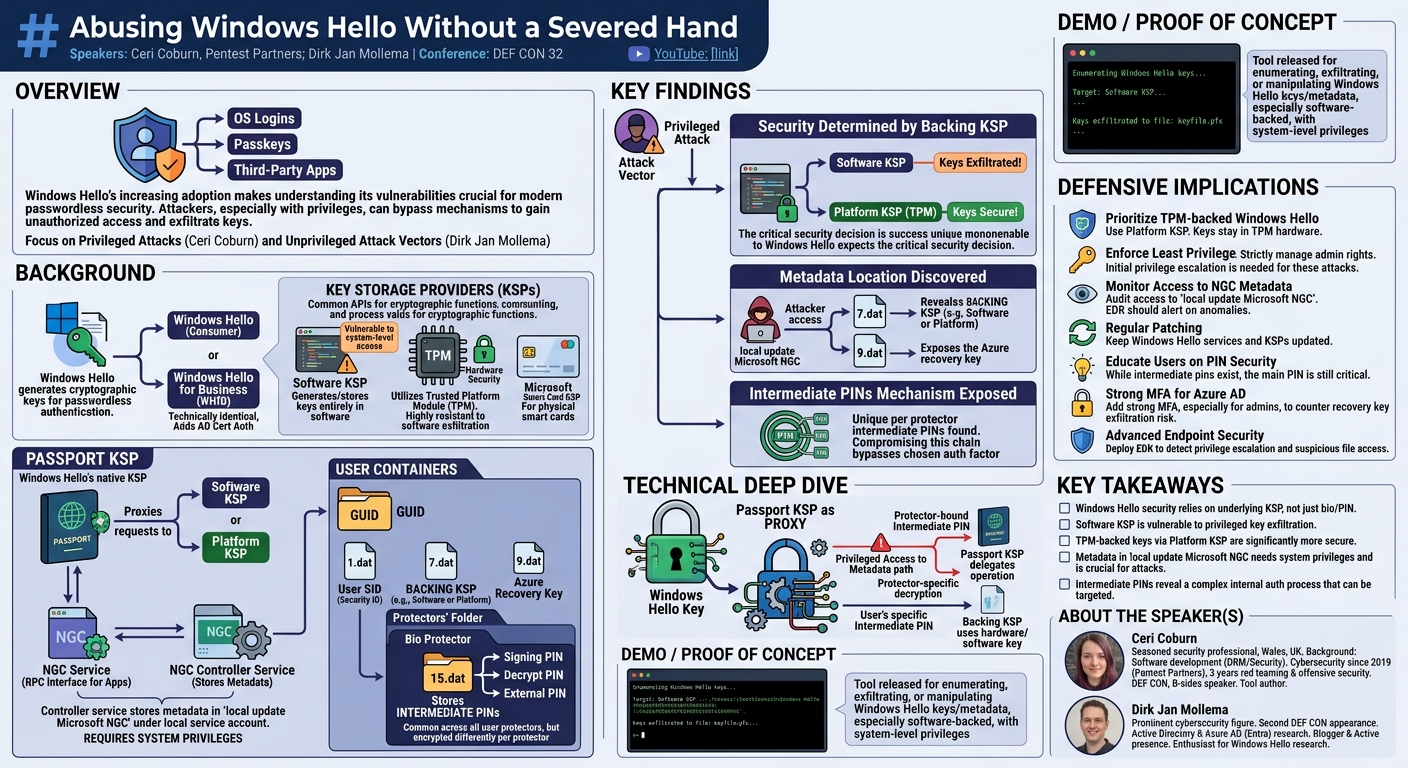
This talk, "Abusing Windows Hello Without a Severed Hand," presented by Ceri Coburn and Dirk Jan Mollema at DEF CON 32, delves into the intricate security mechanisms of Microsoft's Windows Hello technology and exposes critical vulnerabilities. The research primarily focuses on how an attacker, particularly one with elevated privileges, can bypass or exploit the system to gain unauthorized access or exfiltrate sensitive cryptographic material. Given Windows Hello's increasing adoption as a passwordless authentication solution for operating system logins, passkeys, and third-party applications, understanding these attack vectors is paramount for both enterprise and consumer security.
Key moments
- 0:00 Introduction to Abusing Windows Hello
- 2:00 Talk Structure: Privileged vs. Unprivileged Attacks
- 2:15 What is Windows Hello? Microsoft's passwordless technology
- 3:00 Understanding Key Storage Providers (KSPs) and types
- 4:00 Passport KSP and NGC Service architecture explained
- 6:00 Windows Hello Protectors and Intermediate Pin mechanism
Abusing Windows Hello Without a Severed Hand
Speakers: Ceri Coburn, Pentest Partners; Dirk Jan Mollema
Conference: DEF CON 32
YouTube: https://www.youtube.com/watch?v=mFJ-NUnFBac
Overview
This talk, "Abusing Windows Hello Without a Severed Hand," presented by Ceri Coburn and Dirk Jan Mollema at DEF CON 32, delves into the intricate security mechanisms of Microsoft's Windows Hello technology and exposes critical vulnerabilities. The research primarily focuses on how an attacker, particularly one with elevated privileges, can bypass or exploit the system to gain unauthorized access or exfiltrate sensitive cryptographic material. Given Windows Hello's increasing adoption as a passwordless authentication solution for operating system logins, passkeys, and third-party applications, understanding these attack vectors is paramount for both enterprise and consumer security.
The speakers meticulously dissect the underlying architecture of Windows Hello, exploring its reliance on Key Storage Providers (KSPs), the structure of user containers, and the role of various protectors like PINs and biometrics. Their findings highlight a significant weakness when Windows Hello keys are not backed by hardware security modules such as a Trusted Platform Module (TPM), instead relying on software-based key storage. This research offers invaluable insights for security professionals, red teams, and system administrators seeking to harden Windows environments against sophisticated attacks targeting modern authentication systems.
The presentation is structured into two main parts: an analysis of privileged attacks on Windows Hello, led by Ceri Coburn, and a subsequent exploration of unprivileged attack vectors by Dirk Jan Mollema. While the provided transcript focuses heavily on the foundational architecture and the privileged attack surface, the overarching goal of the research is to provide a comprehensive understanding of how Windows Hello can be compromised, underscoring the critical need for robust configuration and defense strategies.
Background
▶ Watch: Introduction to Abusing Windows Hello (0:00)
Windows Hello stands as Microsoft's cornerstone for passwordless authentication, designed to enhance user convenience and security by replacing traditional passwords with biometric or PIN-based verification. At its core, Windows Hello generates cryptographic key pairs for each user enrollment, which can be utilized for logging into the operating system, facilitating passkey authentication, and even integrating with third-party applications. While often discussed in two contexts – standard Windows Hello for consumers and Windows Hello for Business (WHfB) for enterprises – the speakers clarify that there are no technical differences between them; WHfB merely emphasizes certificate-based authentication to Active Directory environments.
The foundation of Windows Hello's cryptographic operations lies within Microsoft's Key Storage Providers (KSPs), a common API for handling cryptographic functions such as encryption, signing, and key agreement. Historically, Windows has supported several KSPs:
- Software Key Storage Provider: As its name suggests, this provider generates and stores keys entirely in software. This makes keys vulnerable to exfiltration if an attacker achieves system-level access to the operating system.
- Platform Key Storage Provider: This is a more secure option designed for machines equipped with a Trusted Platform Module (TPM). Keys managed by the Platform KSP are hardware-backed, making them significantly more resistant to software-based exfiltration.
- Microsoft Smart Card Key Storage Provider: Used specifically for storing private keys on physical smart cards.
Windows Hello itself implements its own KSP, known as the Passport Key Storage Provider. Crucially, the Passport KSP does not perform cryptographic operations directly. Instead, it acts as a proxy, offloading these operations to one of the underlying KSPs mentioned above. This architectural decision is central to the vulnerabilities discussed in the talk.
The intricate workings of the Passport KSP are managed by two privileged services:
- The NGC service: This service acts as the primary interface for applications, communicating with them over an RPC interface.
- The NGC controller service: This service is responsible for storing all the metadata associated with enrolled Windows Hello keys. This metadata is critical for the functioning of Windows Hello and is stored in a specific directory:
local update Microsoft NGCwithin the local service account's context. Accessing this folder requires system-level privileges, highlighting a key target for attackers.
Within this NGC directory, each user has a unique container folder, identified by a GUID. These containers house a collection of protectors, key metadata, and other essential configuration files. The metadata is distributed across various .dat files:
1.dat: Contains the user's Security ID (SID).7.dat: Specifies the backing KSP (e.g., Software KSP or Platform KSP) used for the keys within that container.9.dat: Holds the Azure recovery key, indicating a potential link to cloud-based recovery mechanisms for Azure AD-joined devices.
Protectors represent the various Windows Hello authentication methods. Common examples include the bio protector for face or fingerprint recognition, and the user-configured PIN. A critical file within the protector's context is 15.dat, which stores a set of intermediate PINs. These intermediate PINs—comprising a signing pin, a decrypt pin, and what the researchers believe to be an external pin—are consistent across all protectors for a given user but are encrypted differently depending on the specific protector being used. This multi-layered encryption of intermediate PINs reveals a complex internal authentication process that, if compromised, could lead to significant security bypasses.
Key Findings
▶ Watch: What is Windows Hello? Microsoft's passwordless technology (2:15)
The core findings of this research revolve around the architectural subtleties of Windows Hello and how its design choices create opportunities for exploitation, particularly when an attacker has elevated privileges. The talk clearly delineates the path to compromising Windows Hello by leveraging its reliance on underlying Key Storage Providers (KSPs) and the centralized storage of critical metadata.
The most significant discovery is that the security posture of Windows Hello is fundamentally determined by the backing KSP it utilizes. When Windows Hello is configured to use the Software Key Storage Provider, the cryptographic keys are generated and stored in software. This configuration renders the keys susceptible to exfiltration if an attacker achieves system-level privileges on the target machine. In contrast, systems utilizing a Trusted Platform Module (TPM) and thus the Platform Key Storage Provider offer a significantly enhanced security model, as the keys are hardware-backed and much more difficult to extract. The speakers emphasize that the Passport Key Storage Provider itself does not perform cryptographic operations but rather proxies them to these underlying KSPs, making the choice of backing KSP a critical security decision.
Further, the researchers uncovered the specific locations and formats of crucial Windows Hello metadata. This metadata, stored in the local update Microsoft NGC directory under the local service account, is accessible to attackers with system privileges. The detailed breakdown of .dat files reveals the storage of sensitive information:
1.datcontains the user's Security ID (SID), which is fundamental for user identification within Windows.7.datexplicitly states which backing KSP is in use, providing attackers with a clear indicator of whether keys are hardware-backed (TPM) or software-backed.9.datholds the Azure recovery key, which could have implications for compromising cloud-connected accounts or facilitating recovery key abuse.
Another key finding pertains to the internal authentication mechanisms, specifically the existence and storage of intermediate PINs within 15.dat files. These pins, including a signing pin, a decrypt pin, and an external pin, are common across all protectors for a user but are encrypted uniquely per protector. While the full implications of manipulating these intermediate PINs are not exhaustively detailed in the provided transcript, their discovery points to a complex internal state that could be targeted in more advanced attacks. The ability to decrypt or manipulate these intermediate pins, especially from a privileged perspective, could potentially allow an attacker to bypass biometric or PIN-based authentication without direct access to the user's biometrics or PIN.
In summary, the key findings illustrate that Windows Hello, despite its promise of passwordless security, is vulnerable to sophisticated attacks when its underlying security dependencies (like the KSP) are not adequately secured. The research provides a blueprint for understanding where and how an attacker with system privileges can target Windows Hello's internal components to compromise user authentication.
Technical Deep Dive
▶ Watch: Understanding Key Storage Providers (KSPs) and types (3:00)
The technical foundation of Windows Hello's security, and consequently its vulnerabilities, lies in its modular architecture, particularly its interaction with Key Storage Providers (KSPs) and the management of its internal state. The Passport Key Storage Provider serves as the public-facing KSP for Windows Hello. However, as the researchers highlight, this provider is merely a proxy. It does not implement any public-private key operations itself; instead, it delegates these cryptographic tasks to other KSPs already present in the Windows ecosystem. This delegation mechanism is pivotal: the security strength of a Windows Hello key is directly inherited from the security properties of the backing KSP chosen during enrollment.
The two primary backing KSPs of interest are the Software Key Storage Provider and the Platform Key Storage Provider. The former, by storing keys in software, renders them susceptible to exfiltration if an attacker gains system-level access. This means if a user enrolls in Windows Hello on a system without a TPM, or if the system is configured to prefer software-based key storage, their cryptographic keys are effectively no more secure than any other sensitive data on a compromised system. Conversely, the Platform Key Storage Provider, leveraging a Trusted Platform Module (TPM), stores keys in hardware, making them significantly more resilient to software attacks and exfiltration attempts. The 7.dat file within each user's container explicitly indicates which of these backing KSPs is in use, providing a clear target indicator for an attacker.
The metadata critical to Windows Hello's operation is managed by a two-tiered service architecture: the NGC service and the NGC controller service. The NGC service acts as the communication hub, allowing applications to interact with Windows Hello via an RPC interface. This service then communicates with the NGC controller service, which is the custodian of all enrolled Windows Hello key metadata. This metadata is persistently stored within the local update Microsoft NGC directory. Crucially, this directory is secured such that system-level privileges are required to access its contents. This makes the NGC folder a prime target for attackers who have already achieved privilege escalation on a system.
Within this NGC directory, each Windows user with an enrolled Windows Hello key is assigned a unique container folder, typically identified by a GUID. These container folders are structured to hold various .dat files, each containing specific pieces of metadata:
1.dat: This file stores the user's Security ID (SID). The SID is a fundamental security identifier in Windows, uniquely identifying a user or group. Access to this allows an attacker to correlate cryptographic material with specific user identities.7.dat: This file is particularly significant as it reveals the backing KSP used for the keys within that container. An attacker can inspect this file to determine if the keys are hardware-backed (TPM) or software-backed, informing their exfiltration strategy.9.dat: This file contains the Azure recovery key. For devices integrated with Azure Active Directory (now Entra ID), this key could potentially be used for account recovery or further cloud-based attacks, depending on its specific implementation and protection.
Beyond the key storage and container metadata, the research also sheds light on the internal workings of Windows Hello protectors. These protectors represent the various authentication factors a user can enroll, such as biometrics (face or fingerprint via the bio protector) or a PIN. A key file associated with these protectors is 15.dat. This file stores a set of intermediate PINs that are essential for the internal authentication flow. The speakers identified three types of intermediate PINs: a signing pin, a decrypt pin, and an external pin. While these intermediate PINs are consistent across all protectors for a given user, they are encrypted differently depending on the specific protector used for authentication. This implies a sophisticated internal mechanism where the user's chosen authentication method (e.g., face scan or PIN entry) decrypts a specific protector-bound intermediate PIN, which then, in turn, facilitates the decryption or signing operation using the actual Windows Hello key. The ability to extract or manipulate these encrypted intermediate PINs, especially for software-backed keys, could lead to a bypass of the user's chosen authentication method.
In essence, the technical deep dive reveals that Windows Hello's security is not monolithic but rather a chain of dependencies. A weakness in any link—particularly the use of a software-backed KSP or the susceptibility of metadata storage to privileged access—can compromise the entire system, allowing attackers to effectively abuse Windows Hello without requiring physical presence or complex biometric spoofing.
Demo / Proof of Concept
▶ Watch: Passport KSP and NGC Service architecture explained (4:00)
Ceri Coburn mentioned performing a "quick tool demonstration of the tool that was released as part of this research." However, the provided transcript does not include any details about the tool's name, its specific functionalities, or the steps involved in the demonstration. Based on the preceding technical discussion about abusing Windows Hello from a privileged perspective, it can be inferred that the tool likely facilitates the enumeration, exfiltration, or manipulation of Windows Hello keys and metadata, particularly when they are backed by the Software Key Storage Provider and an attacker has system-level privileges.
Defensive Implications
▶ Watch: Windows Hello Protectors and Intermediate Pin mechanism (6:00)
The research into abusing Windows Hello carries significant implications for defenders, highlighting critical areas where security can be strengthened. The primary defensive strategy should focus on ensuring that Windows Hello keys are always hardware-backed, specifically by utilizing a Trusted Platform Module (TPM).
- Prioritize TPM-backed Windows Hello: The most crucial takeaway is to leverage the Platform Key Storage Provider, which stores keys within a TPM. This significantly mitigates the risk of key exfiltration, even if an attacker achieves system-level privileges. Organizations should ensure that all endpoints support and are configured to use TPM 2.0 for Windows Hello for Business enrollments. Group Policy Objects (GPOs) and Mobile Device Management (MDM) solutions can enforce TPM-backed key storage.
- Enforce Least Privilege: The attack vectors discussed heavily rely on an attacker first gaining system-level privileges. Implementing and strictly enforcing the principle of least privilege across all user accounts and applications is fundamental. Regularly audit and reduce unnecessary administrative rights to minimize the attack surface.
- Monitor Access to NGC Metadata: Defenders should implement robust logging and monitoring for anomalous access attempts to the
local update Microsoft NGCdirectory. This directory contains critical Windows Hello metadata, and any unauthorized access could indicate a sophisticated attack in progress. Endpoint Detection and Response (EDR) solutions should be configured to alert on suspicious activity within this path.
- Regular Patching and Updates: While no specific CVEs were mentioned, Microsoft continuously releases security updates. Keeping Windows operating systems and related components fully patched is essential to address any underlying vulnerabilities in KSPs, the NGC services, or the handling of Windows Hello metadata that could be exploited by attackers.
- Educate Users on PIN Security: Although biometric authentication is often highlighted, the PIN remains a fallback. Users should be educated on creating strong, unique PINs and the importance of not sharing them. While the research delves into intermediate PINs, the user-facing PIN is still a critical component of the authentication chain.
- Implement Strong Multi-Factor Authentication (MFA) for Azure AD: Given the mention of Azure recovery keys in
9.dat, organizations leveraging Azure AD (now Entra ID) should enforce strong MFA for all user accounts, especially for administrative roles. This adds a crucial layer of defense against potential recovery key abuse, even if an attacker manages to exfiltrate it.
- Consider Advanced Endpoint Security: Deploying advanced endpoint security solutions that can detect and prevent privilege escalation techniques and suspicious file access patterns can help thwart the initial stages of an attack that targets Windows Hello.
By focusing on hardware-backed security, strict access controls, and vigilant monitoring, organizations can significantly reduce their exposure to the types of Windows Hello abuses detailed in this research.
Key Takeaways
- The security of Windows Hello is critically dependent on its underlying Key Storage Provider (KSP), not just the biometric or PIN authentication method.
- When Windows Hello keys are backed by the Software Key Storage Provider, they are vulnerable to exfiltration if an attacker achieves system-level privileges.
- Utilizing a Trusted Platform Module (TPM) for Windows Hello, through the Platform Key Storage Provider, significantly enhances security by hardware-backing the cryptographic keys.
- Critical Windows Hello metadata, including user SIDs and the specific backing KSP, is stored in
.datfiles within thelocal update Microsoft NGCdirectory, requiring system privileges for access. - Windows Hello uses intermediate PINs (signing, decrypt, external) stored in
15.datfiles, which are consistent per user but encrypted uniquely per protector, revealing a complex internal authentication process. - Defenders should prioritize TPM-backed Windows Hello, enforce least privilege, and monitor for anomalous access to the
NGCmetadata directory to mitigate these attack vectors.
About the Speaker(s)
Ceri Coburn is a seasoned security professional from Wales, United Kingdom. With a background spanning approximately 18 years in software development, particularly within the DRM and security solution space, Ceri transitioned into cybersecurity in 2019, joining Pentest Partners. For the past three years, he has dedicated his expertise to red teaming and offensive security, reflecting his passion for uncovering vulnerabilities. Ceri is a recognized speaker, having presented at DEF CON last year and various B-sides events. He is also an accomplished author, with several tools available on GitHub, primarily focused on offensive security but also contributing to defensive capabilities.
Dirk Jan Mollema is a prominent figure in the cybersecurity community, making his second appearance at DEF CON. He has delivered talks at numerous conferences, initially gaining recognition for his work on Active Directory tools. His research interests have since expanded to the Azure AD space, now known as Entra. Dirk Jan maintains an active presence online through his blog and Twitter account, where he shares his insights and research. He expressed enthusiasm for presenting their latest research on Windows Hello, demonstrating his ongoing commitment to exploring and revealing security findings in critical Microsoft technologies.
Reviews
Dr. Zero (Offensive Security Researcher) — STRONG ACCEPT
This research meticulously dissects the internal architecture of Windows Hello, moving beyond surface-level discussions to expose critical vulnerabilities stemming from its reliance on underlying Key Storage Providers. The detailed analysis of NGC service metadata and the discovery of intermediate PINs provides actionable intelligence for hardening enterprise environments. While the core concept of software vs. hardware-backed keys isn't entirely novel, the depth of the technical investigation and the specific mechanisms revealed make this a highly impactful and valuable contribution to understanding modern Windows authentication security.
Heather Calloway (CISO) — STRONG ACCEPT
This DEF CON presentation on Windows Hello vulnerabilities provides a clear and actionable breakdown of how key storage choices fundamentally impact enterprise security. By dissecting the difference between software-backed and TPM-backed keys, the speakers offer critical insights for CISOs and security leaders to evaluate their authentication posture, enforce appropriate governance, and implement effective defensive strategies. It’s a credible examination of a widely used technology, offering practical relevance for anyone managing identity and access risk.