Your Passkey is Weak: Phishing the Unphishable
Chad Spensky, Ph D
DEF CON 33 · Day 1 · Main Stage
Overview
In a revealing and impactful presentation at DEF CON, Chad Spensky, Ph D, delivered a critical analysis of the current state of passkeys, challenging the prevailing industry narrative that they are inherently "unphishable." Titled "Your Passkey is Weak: Phishing the Unphishable," Spensky meticulously demonstrated how the widespread adoption of synced passkeys – a convenience feature introduced by major tech companies like Google and Apple – fundamentally undermines the security guarantees originally envisioned by the FIDO Alliance. This talk is crucial for anyone involved in cybersecurity, from individual users to enterprise CISOs, as it exposes a significant vulnerability that could lead to widespread account compromise, despite the industry's push towards a passwordless future.
Key moments
- 0:00 Why passwords are dead and phishing is the problem.
- 2:00 Asymmetric keys and FIDO's original promise of security.
- 3:07 FIDO's critical mistake: syncing passkeys across devices.
- 4:20 Real-world examples driving the passkey phishing attack.
- 4:58 The simple methodology for phishing synced passkeys.
- 6:00 Trivial phishing of passkey PIN despite "fishing resistant" claims.
- 6:30 Devastating consequences: attacker takes over, user locked out.
Your Passkey is Weak: Phishing the Unphishable
Speakers: Chad Spensky, Ph D
Conference: DEF CON
YouTube: https://www.youtube.com/watch?v=xdl08cPDgtE
Overview
In a revealing and impactful presentation at DEF CON, Chad Spensky, Ph D, delivered a critical analysis of the current state of passkeys, challenging the prevailing industry narrative that they are inherently "unphishable." Titled "Your Passkey is Weak: Phishing the Unphishable," Spensky meticulously demonstrated how the widespread adoption of synced passkeys – a convenience feature introduced by major tech companies like Google and Apple – fundamentally undermines the security guarantees originally envisioned by the FIDO Alliance. This talk is crucial for anyone involved in cybersecurity, from individual users to enterprise CISOs, as it exposes a significant vulnerability that could lead to widespread account compromise, despite the industry's push towards a passwordless future.
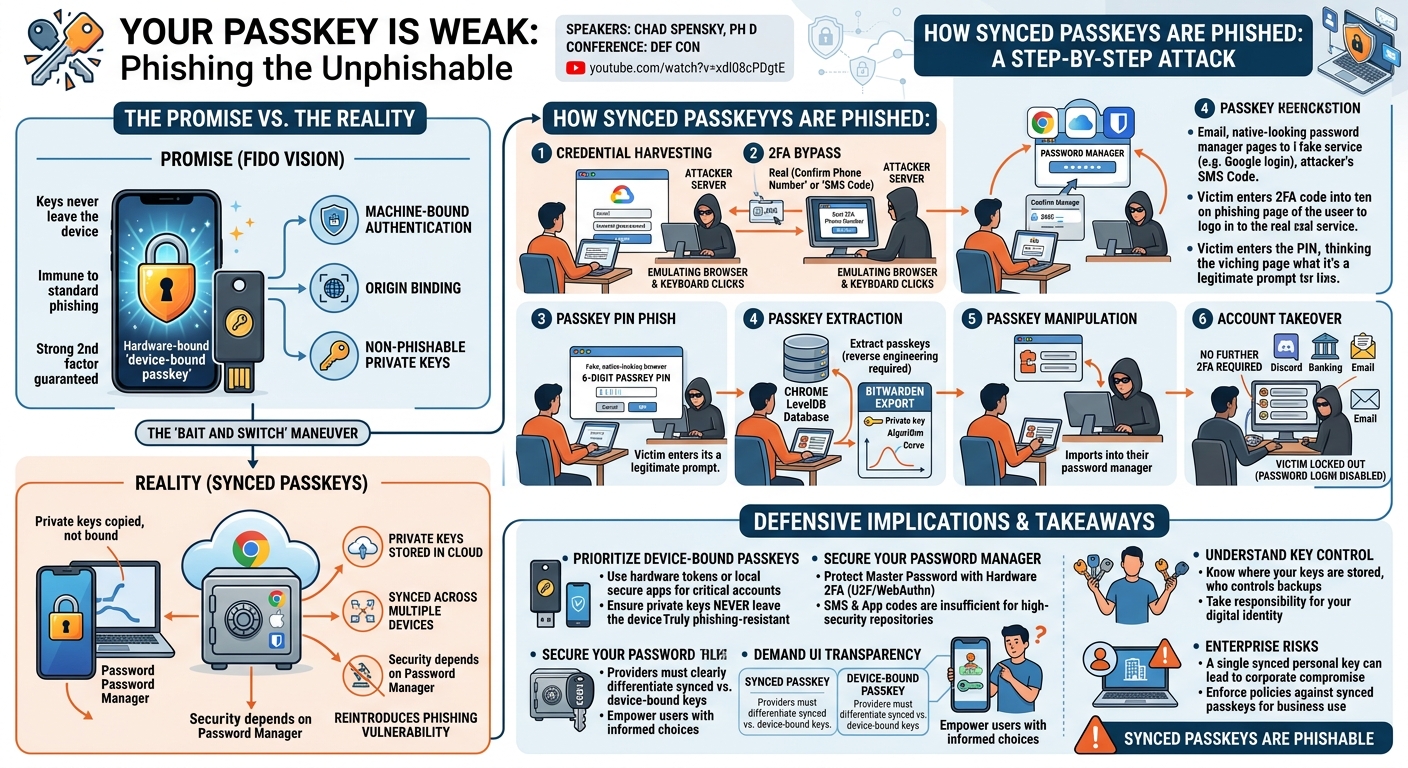
Spensky's core argument revolves around a "bait and switch" maneuver: while the FIDO2 specification initially promised machine-bound authentication resistant to phishing, the move to sync private keys across multiple devices via password managers reintroduces a critical attack surface. By compromising a user's password manager, an attacker can gain control over all associated synced passkeys, effectively bypassing their vaunted phishing resistance. The implications are severe, as a stolen passkey, unlike a password, is often assumed to be so secure that it negates the need for additional security factors, leaving victims with potentially irreversible account loss.
The presentation not only highlights the technical feasibility of these attacks but also underscores a broader philosophical concern: the erosion of user control over their own digital identities and private keys. Spensky advocates for a return to device-bound passkeys and greater transparency from providers, empowering users to make informed security decisions. His work serves as a vital wake-up call, urging the security community to re-evaluate the practical implementation of passkeys and push for solutions that truly uphold the principles of strong, phishing-resistant authentication.
Background
▶ Watch: Why passwords are dead and phishing is the problem. (0:00)
The journey towards a passwordless future has been a long and arduous one, driven by the undeniable vulnerability of passwords to phishing attacks. As Chad Spensky eloquently states, "Fishing has killed the password star." No amount of complexity, salting, or database hardening can prevent a determined attacker from tricking a user into typing their credentials into a malicious site. This fundamental flaw has propelled the industry to seek more robust authentication mechanisms.
The solution, for many years, has been asymmetric cryptography, which employs a pair of mathematically linked keys: a private key that remains secret and a public key that can be shared widely. The private key is used to sign data (proving identity) or decrypt messages, while the public key verifies signatures or encrypts data for the private key holder. This paradigm shift, first realized with technologies like RSA, offers a powerful way to authenticate without ever transmitting a secret over the network, making it inherently more secure against interception.
Over the decades, various standards have emerged to leverage asymmetric keys for authentication at scale. Early examples include X.509 certificates (used in TLS/SSL for HTTPS), PGP for email encryption, and SSH keys for secure remote access. More recently, the FIDO Alliance introduced a suite of specifications aimed at standardizing strong, phishing-resistant authentication. U2F (Universal 2nd Factor), launched in 2014, enabled hardware-bound tokens (like YubiKeys) for a second factor. UAF (Universal Authentication Framework) followed, aiming for multi-factor authentication using biometrics.
The pinnacle of these efforts was FIDO2, announced in 2015, which promised to be the "death of the password." A key tenet of FIDO2, as outlined in its 2017 draft documents, was that it "must be non-fishable" and "must be machine-bound authentication and authorization." This meant that private keys were intended to be securely stored on a specific device (e.g., in a TPM or secure enclave) and could not be easily moved or copied. This vision was met with enthusiasm by security researchers, including Spensky, who saw it as the long-awaited panacea for authentication woes. However, in 2022, a critical shift occurred: major tech companies began implementing synced passkeys, allowing private keys to be synchronized across a user's devices via cloud-based password managers (like Google Chrome's password manager or Apple iCloud Keychain). This seemingly convenient feature, in Spensky's view, constituted a "bait and switch," directly contradicting FIDO2's foundational principles of non-phishability and machine-bound security, thus reintroducing the very attack vectors passkeys were designed to eliminate.
Key Findings
▶ Watch: FIDO's critical mistake: syncing passkeys across devices. (3:07)
Chad Spensky's research unveils several critical findings regarding the vulnerability of passkeys, particularly those that are synced across devices. His central discovery is that the "unphishable" promise of passkeys is fundamentally broken by their synchronization mechanisms, making them susceptible to surprisingly simple phishing attacks.
Firstly, synced passkeys are highly phishable via password manager compromise. The FIDO2 specification was designed to prevent phishing by binding authentication to a specific device and origin. However, when private keys are synced to cloud-based password managers (e.g., Chrome, iCloud, Bitwarden), the security posture becomes dependent on the security of that password manager. If an attacker can trick a user into entering their master password and multi-factor authentication (MFA) code for their password manager on a phishing site, they gain access to all synced passkeys. This is a direct contradiction to FIDO2's original intent for machine-bound keys.
Secondly, a leaked passkey is demonstrably worse than a leaked password. Websites that adopt passkeys often assume their inherent phishing resistance and therefore frequently bypass additional security checks or secondary factors once a passkey is used for login. In contrast, if an attacker steals a traditional password, many sites still require a second factor (like an SMS code or authenticator app). With a stolen passkey, the attacker often gains unfettered access, as the passkey itself is treated as sufficient proof of identity and a strong second factor combined. Some websites even disable password-only login once a passkey is enrolled, making recovery significantly harder for the victim if their passkey is compromised.
Thirdly, the core assumption of asymmetric cryptography—that the private key remains private—is violated by syncing. Spreading private keys across multiple devices and cloud services introduces numerous potential weak points. A compromise on any single device (e.g., malware on a home computer, a faulty TPM, or a vulnerable phone) can lead to the complete compromise of all synced passkeys. This contrasts sharply with a scenario where each device holds a unique, device-bound key, allowing for isolated compromises and easier revocation.
Fourthly, the absence of a trusted input/output channel for sensitive operations, such as entering a passkey PIN, makes these prompts highly phishable. When a browser displays a prompt for a passkey PIN, it often looks identical to a web page, making it impossible for a user to definitively distinguish a legitimate browser prompt from a malicious phishing attempt. This design flaw within the browser's interaction model is a critical vulnerability.
Finally, Spensky highlights the critical user experience gap: users cannot easily differentiate between secure device-bound passkeys and vulnerable synced passkeys. The UI presented by providers often obscures this crucial distinction, leading users to unknowingly adopt the less secure synced option. This lack of transparency prevents users from making informed security choices, leaving them exposed to risks they are unaware of.
Technical Deep Dive
▶ Watch: Real-world examples driving the passkey phishing attack. (4:20)
The attack methodology detailed by Chad Spensky is alarmingly straightforward, leveraging the very convenience features intended to simplify passkey usage. The core idea is to pivot from a traditional phishing attack against a user's password manager to a comprehensive compromise of all their synced passkeys.
The attack initiates with the creation of a highly convincing phishing site, designed to mimic legitimate login pages for popular cloud services or password managers such as Google, Apple iCloud, or Bitwarden. The attacker's objective is to obtain the user's master credentials for these services. Spensky emphasizes that this isn't a sophisticated API-level attack; rather, the attacker's server effectively emulates a browser, receiving the user's inputs and then programmatically "typing" them into a legitimate login flow on their own server-side browser instance. This technique, involving the emulation of keyboard and mouse clicks, bypasses potential API restrictions or browser-specific phishing detections, making the attack appear as a legitimate user interaction to the service provider.
Once the victim enters their username and master password on the phishing site, the attacker captures these credentials. If the password manager or cloud service employs two-factor authentication (2FA), the attacker's emulated browser will present the 2FA challenge to the victim, who, believing they are interacting with the legitimate service, will provide the necessary code (e.g., SMS, authenticator app). Critically, Spensky points out the weakness of certain 2FA methods, like Google's "confirm phone number" option, where only the last four digits of a phone number are required. As he demonstrated with his own phone number, the remaining digits can often be found through public data breaches or OSINT (Open Source Intelligence), rendering this 2FA method largely ineffective.
After successfully authenticating into the victim's password manager or cloud account, the attacker waits for the passkeys to sync. This automatic synchronization is the lynchpin of the entire attack. Many password managers protect synced passkeys with an additional PIN. Spensky reveals that this PIN prompt, conveniently, often appears as a web-browser-like dialog, making it trivial for the attacker to present a fake version of this prompt on their phishing site and capture the PIN as well. This effectively provides the attacker with full control over the synced passkeys.
The next phase involves passkey extraction and manipulation:
- Chrome Passkeys: For Chrome, passkeys are stored in a LevelDB database located at
~/.config/Google/Chrome/Default/passkeyson Linux, or equivalent paths on other OS. While these are encrypted, the decryption key necessarily resides on the local machine. Spensky suggests that an attacker, having compromised the machine via the phishing attack (or subsequent malware), could undertake a reverse engineering challenge to extract and decrypt these keys from memory or disk. This allows for deletion of the original keys and their re-importation elsewhere. - Bitwarden Passkeys: Bitwarden, a popular third-party password manager, is even more accommodating to the attacker. Once logged into the compromised Bitwarden account, the attacker can use the application's developer tools or export features to directly extract passkeys. Bitwarden, in its design for user control, provides the private key, the cryptographic algorithm, and the curve used for each passkey (e.g., for
discord.com). This direct export capability makes the attack significantly simpler than reverse engineering Chrome's storage.
With the passkeys extracted, the attacker can then delete them from the victim's account and import them into their own password manager. This grants the attacker seamless access to all services the victim had enrolled with passkeys, often without any further 2FA prompts, as the stolen passkey itself is considered the strongest authentication factor. The devastating consequence is that some services may even disable password-based login once a passkey is enrolled, leaving the victim with no easy recovery path if their passkeys are stolen and deleted. The standardized nature of the FIDO2 protocol ensures that these stolen passkeys will function across any compliant service, making the compromise widespread and highly effective.
Demo / Proof of Concept
▶ Watch: Trivial phishing of passkey PIN despite "fishing resistant" claims. (6:00)
Chad Spensky backed his claims with clear, actionable proof-of-concept demonstrations, making the theoretical vulnerabilities tangible. All the code and related analysis are publicly available on GitHub at github.com/authenticate/youpasskeyisweak and summarized on the accompanying website, passkeyisweak.com.
The first demonstration focused on compromising a Google account using synced passkeys:
- Setup: Spensky created a brand new Google account (
[email protected]), ensured a clean security checkup, enabled 2FA, and enrolled several passkeys onwebn.io(a site for testing WebAuthn/passkeys). - Attacker Environment: The attacker's machine was set up on a VPN, simulating an origin from Canada to avoid immediate suspicion.
- Phishing Execution: The victim was shown browsing to a Flask instance running a phishing site designed to look indistinguishable from Google's login page.
- Credential Capture: The victim typed their email and password. Crucially, Spensky demonstrated the attacker's server emulating key presses into a headless Chrome browser instance on the attacker's side, effectively logging into the actual Google account.
- 2FA Bypass: The victim was then prompted for their SMS 2FA code, which they entered into the phishing site. Again, the attacker's server emulated this input into the real Google login flow.
- Passkey PIN Capture: Following successful login, the victim was presented with a prompt to "turn on sync," and then a separate prompt for the six-digit passkey PIN. Both of these prompts, looking native to a web browser, were easily phished.
- Passkey Export: Once the attacker had successfully logged into the victim's Google account and enabled sync, they demonstrated navigating to the password manager settings within the compromised Chrome instance and using the "File -> Save As" option to export all stored passwords and, implicitly, the associated synced passkeys.
- Account Takeover: The attacker could then launch their own Chrome instance, configured with the exported profile, and log in to any service using the victim's stolen passkeys, demonstrating complete account takeover. This highlighted how simply stealing a password manager's credentials, even with 2FA, directly leads to passkey compromise.
The second demonstration targeted Bitwarden, a popular third-party password manager:
- Bitwarden Phishing: Similar to the Google attack, the victim was phished for their Bitwarden master password on a spoofed Bitwarden login page.
- Credential Capture & Login: The attacker captured the master password and used it to log into the victim's Bitwarden account on their own machine.
- Direct Passkey Export: Unlike Chrome, Bitwarden offers more direct access to stored passkey data. Spensky showed how, once logged into the victim's Bitwarden, the attacker could navigate to a specific passkey (e.g., for Discord), and easily export its details, including the private key, the cryptographic algorithm, and the curve used.
- Passkey Migration & Use: The attacker then deleted the passkey from the victim's Bitwarden account and imported it into their own Bitwarden instance. Finally, they logged into Discord using the newly imported (stolen) passkey, once again proving that the "fishing resistant" promise was easily broken.
These demonstrations unequivocally illustrate that the convenience of synced passkeys, coupled with the inherent phishability of web-based login flows and the lack of a trusted input channel for PINs, creates a critical vulnerability that undermines the very security benefits passkeys were designed to provide.
Defensive Implications
▶ Watch: Devastating consequences: attacker takes over, user locked out. (6:30)
The findings presented by Chad Spensky carry profound implications for both individual users and enterprises. The primary defensive strategy revolves around understanding the critical distinction between synced passkeys and device-bound passkeys and prioritizing the latter, especially for high-value accounts.
- Prioritize Device-Bound Passkeys: The most crucial recommendation is to avoid using synced passkeys for critical accounts like banking, email, or primary identity providers. Instead, users should opt for device-bound passkeys. These keys are generated and stored securely on a specific hardware device (e.g., a USB security key like a YubiKey, or a dedicated, secure app on a smartphone that keeps the key locally). Device-bound passkeys never leave the hardware, making them genuinely resistant to the types of phishing attacks demonstrated. Spensky's own project,
download.authenticate.com, offers a free device-bound passkey app for smartphones. - Secure Password Managers with Hardware 2FA: Given that the attack vector primarily targets the password manager, securing this central repository is paramount. Users should protect their master password with the strongest possible multi-factor authentication (MFA), ideally a hardware-based FIDO2 security key (U2F/WebAuthn token). Relying on SMS or even app-based authenticator codes for password manager access, while better than nothing, is still susceptible to sophisticated phishing or social engineering, as demonstrated by the weakness of Google's "confirm phone number" 2FA option.
- Demand Better User Interface (UI) from Providers: A significant challenge is that users currently cannot easily discern whether they are generating a synced or a device-bound passkey. Spensky advocates for clear, transparent UI elements from passkey providers (browsers, OS, password managers) that explicitly state the type of passkey being created and its storage implications. This would empower users to make informed security choices. Until such UI is widespread, resources like
passkeyisweak.comaim to provide a community-driven repository of which password managers sync passkeys and which do not. - Understand Key Control and Backups: Users must take ownership of their keys. If passkeys are going to be a central part of digital identity, users need to understand where their private keys are stored, how they are backed up, and who controls those backups. Relying solely on convenience offered by large tech companies without understanding the underlying security model is inherently risky.
- Enterprise Considerations: For organizations, the implications are particularly severe. A single employee accidentally saving a corporate password to their personal, synced Chrome password manager (as in the "Alice" example shared by Spensky) can lead to a corporate compromise. Enterprises should enforce policies that prohibit the use of synced passkeys for corporate accounts and mandate the use of device-bound FIDO2 tokens for critical systems. They should also educate employees about the risks of synced passkeys and the importance of strong, hardware-backed 2FA for all password managers.
- Avoid Downgrade Attacks: Be aware that some services might disable password-only login once a passkey is enrolled. While intended to prevent downgrade attacks (forcing users to a weaker authentication method), this can lock users out if their passkey is stolen and deleted. This reinforces the need for secure, device-bound passkeys.
In essence, the defensive posture must shift from simply adopting "passkeys" to critically evaluating how those passkeys are implemented and managed. Convenience at the expense of core security principles is a trade-off that, as Spensky demonstrates, can lead to devastating consequences.
Key Takeaways
- Synced Passkeys are Phishable: Despite marketing claims, passkeys synced across devices via password managers are highly vulnerable to phishing attacks that target the password manager itself.
- Password Manager Compromise Leads to Passkey Theft: If an attacker can compromise a user's password manager (e.g., Google Chrome, Apple iCloud, Bitwarden) through phishing for its master credentials and 2FA, they can gain control of all synced passkeys.
- Stolen Passkeys are More Dangerous than Passwords: Websites often treat passkeys as inherently secure and may bypass additional 2FA, meaning a stolen passkey grants an attacker unfettered access, potentially without any further security checks.
- Device-Bound Passkeys are the Secure Solution: For true phishing resistance, users should prioritize device-bound passkeys stored on dedicated hardware (like USB security keys) or secure, local applications on smartphones, rather than relying on cloud-synced versions.
- Lack of User Transparency: Current user interfaces often fail to clearly differentiate between secure device-bound and vulnerable synced passkeys, preventing users from making informed security decisions.
- Control Your Keys: Users must take greater responsibility for understanding where their private keys are stored and how they are backed up, rather than blindly trusting convenience features provided by large tech platforms.
About the Speaker(s)
Chad Spensky, Ph D, is a prominent voice in the cybersecurity community, known for his incisive research and advocacy for decentralized and user-controlled security. His work consistently challenges conventional wisdom and pushes for more robust, transparent security paradigms. In his DEF CON talk, Spensky passionately articulated his core belief that "everybody deserves to be secure on the internet, even if you're not a cybersecurity expert." He has dedicated a significant portion of his career to this mission, having left a previous role to focus on developing products that enable secure, device-bound authentication. He is actively involved with authenticate.com, an initiative aimed at providing free device-bound passkey applications, empowering users to control their digital identities and keys. His commitment to practical, accessible security solutions underscores his technical expertise and his dedication to improving internet safety for all.
Reviews
Dr. Zero (Offensive Security Researcher) — STRONG ACCEPT
Spensky does real work here — he picks apart the FIDO2 bait-and-switch with live demos against Google and Bitwarden, showing that synced passkeys inherit exactly the phishability passkeys were supposed to kill. The attack chain (phish the password manager, emulate keystrokes server-side, exfiltrate via LevelDB or Bitwarden's export, replay on attacker-controlled Chrome) is concrete, reproducible, and publicly released. Minor drag is that the core insight — 'synced keys are only as strong as the sync mechanism' — is something sharp practitioners already suspected; the value is in the rigorous demonstration and the Bitwarden export path being even simpler than expected.
Heather Calloway (CISO) — SOLID
Spensky makes a real, demonstrable point: synced passkeys inherit the attack surface of password managers, and the industry narrative of 'unphishable' is doing active harm. The research is technically sound and the demos are clean. But the talk stops at the edge of where it actually matters — enterprise deployment decisions, vendor accountability, and what organizations should be demanding from providers — and never crosses over.