The PowerPoint Glove
Parsia Hakimian (Microsoft)
DEF CON 33 · Day 1 · Main Stage
Overview
In "The PowerPoint Glove" at DEF CON, Parsia Hakimian from Microsoft presented an ambitious and entertaining project: repurposing a vintage Nintendo Power Glove as a modern Bluetooth Human Interface Device (HID) for controlling presentations and other computer functions. This talk delves into the fascinating world of retro hardware hacking, demonstrating how an iconic, yet notoriously unreliable, 1980s gaming accessory can be brought into the 21st century through embedded systems development.
Key moments
- 0:00 Introduction and immediate Power Glove demo
- 0:41 Overview of the talk's agenda
- 2:45 The motivation behind using the Power Glove
- 4:30 Power Glove's history, origin, and creators
- 6:08 The Wizard movie and the Power Glove's true functionality
- 7:35 Explanation of the original Power Glove's mechanics
The PowerPoint Glove
Speakers: Parsia Hakimian, Microsoft
Conference: DEF CON
YouTube: https://www.youtube.com/watch?v=SJ-kfVUoENk
Overview
In "The PowerPoint Glove" at DEF CON, Parsia Hakimian from Microsoft presented an ambitious and entertaining project: repurposing a vintage Nintendo Power Glove as a modern Bluetooth Human Interface Device (HID) for controlling presentations and other computer functions. This talk delves into the fascinating world of retro hardware hacking, demonstrating how an iconic, yet notoriously unreliable, 1980s gaming accessory can be brought into the 21st century through embedded systems development.
Hakimian's motivation stems from a desire to make technical presentations truly memorable, drawing inspiration from security legends like Barnaby Jack, who combined technical wizardry with theatrical flair. He argues that presentations need either extreme technical depth, compelling charisma, or engaging "hijinks" to stand out. The Power Glove project squarely falls into the latter category, serving as a unique and visually striking prop that also showcases significant technical ingenuity.
Beyond the novelty of using a Power Glove to advance slides, the talk provides a detailed walkthrough of the challenges and solutions involved in interfacing legacy hardware with contemporary systems. It covers critical aspects of embedded development, including voltage level shifting, microcontroller selection, battery management, and the implementation of Bluetooth HID profiles for both mouse and keyboard functionality. This project not only breathes new life into a piece of gaming history but also offers valuable insights for anyone interested in custom hardware interfaces or making their technical demonstrations unforgettable.
Background
▶ Watch: Introduction and immediate Power Glove demo (0:00)
The Nintendo Power Glove, released in 1989, holds a peculiar place in gaming history. Despite its futuristic appearance and prominent feature in the cult classic film "The Wizard," it was widely regarded as a commercial failure due to its poor accuracy and cumbersome controls. Hakimian humorously notes that while it is "functional," it "barely worked" for most kids who owned it. Interestingly, the Power Glove was not developed by Nintendo itself but by a third-party company, Mattel, as Nintendo sought to enter the US toy market beyond video games. In Japan, it was known as the PAX Famcom Glove.
The original Power Glove system relied on a set of ultrasonic sensors placed around a television. The glove itself emitted rapid "tick tick tick" hypersonic sound waves. By measuring the Doppler effect and timing differences, the sensors could theoretically track the glove's XYZ position and orientation, allowing for rudimentary air gestures. The glove also featured traditional buttons (A, B, Start, Select, and directional arrows) that connected via a DB9 connector to a junction box, which then interfaced with the Nintendo Entertainment System (NES) via a 7-pin connector. The NES's CPU, operating at a mere 1.79 MHz, was designed to poll the gamepad inputs at a slow rate, approximately 20 Hz. This slow polling rate would later become a critical consideration for Hakimian's project.
Prior attempts to modernize the Power Glove have been documented by others in the hacking community. Ben Heck, a renowned hardware modder, performed a teardown in 2016, attempting to convert the Power Glove into a functional computer mouse, but found its inherent inaccuracy made it largely impractical. Another individual, Dr. Benjamin Blondo, successfully created a wired joystick interface for the Power Glove. While Blondo's released code proved difficult for Hakimian to adapt, his work provided invaluable documentation, specifically the pinout for the Power Glove's DB9 connector, which was crucial for initiating this project. These prior efforts highlighted the technical hurdles and the persistent allure of making the "so bad it's good" Power Glove actually work.
Key Findings
▶ Watch: The motivation behind using the Power Glove (2:45)
Hakimian's project demonstrates several key findings and contributions in the realm of retro hardware integration and embedded systems development. First and foremost, he successfully proved that the Nintendo Power Glove, despite its historical reputation for poor functionality, can indeed be repurposed into a reliable, albeit "clunky," Bluetooth Human Interface Device (HID). This transformation required overcoming significant technical challenges related to voltage compatibility, communication protocols, and the inherent limitations of the vintage hardware.
A major finding was the successful reverse-engineering and implementation of the Power Glove's communication protocol, which essentially mimics an NES gamepad. By understanding the timing and data structure of the latch and data pins, Hakimian was able to accurately read button presses and directional inputs. This involved careful consideration of the original NES's slow polling rate versus modern microcontroller speeds, preventing damage to the delicate vintage electronics.
Furthermore, the project highlighted critical considerations in modern embedded development, particularly the necessity of voltage level shifting when interfacing 5-volt legacy components with contemporary 3.3-volt microcontrollers. Hakimian's experience with "killing a bunch" of ESP32 dev boards underscored this practical challenge, leading to the adoption of specific hardware solutions like dedicated level shifters or 5V-tolerant microcontrollers. The talk also showcased the feasibility of creating custom Bluetooth HID profiles for both mouse and keyboard emulation on cost-effective, readily available microcontrollers like the ESP32, transforming simple button presses into complex computer commands.
Technical Deep Dive
▶ Watch: Power Glove's history, origin, and creators (4:30)
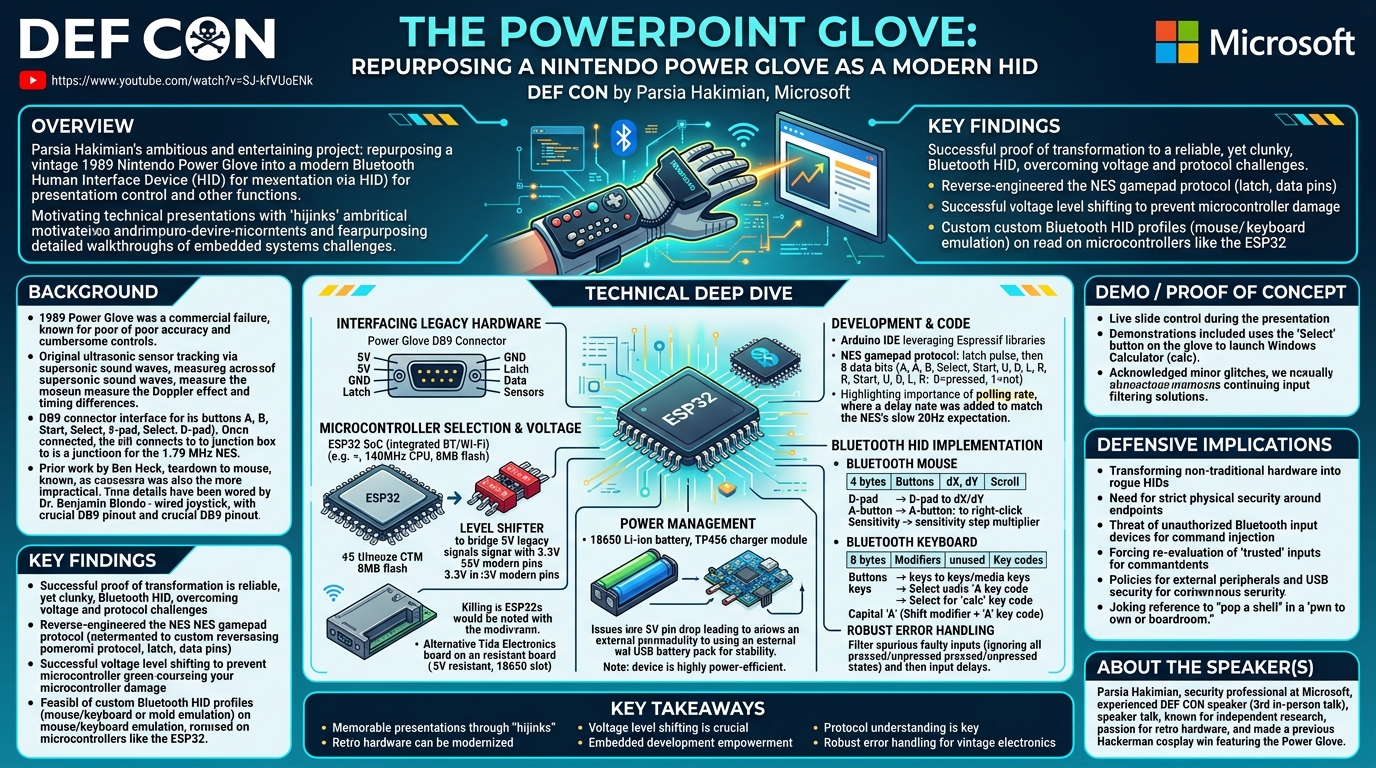
The core of "The PowerPoint Glove" project lies in its meticulous technical execution, bridging the gap between decades-old hardware and modern computing. The journey began with understanding the Power Glove's electrical interface, primarily through the DB9 connector pinout documented by Dr. Benjamin Blondo. This pinout identified crucial lines: 5 volts (for power), ground, latch, data, and lines for the ultrasonic sensors. Hakimian focused on the buttons, as the unreliable nature of the original ultrasonic sensors persisted, even with multiple Power Glove units.
The choice of microcontroller was paramount. Hakimian initially considered the ESP32 dev board, a popular system on a chip (SoC) known for its integrated Bluetooth and Wi-Fi capabilities, along with a relatively powerful CPU (e.g., 140 MHz, 8 MB flash). However, a significant hurdle emerged: the ESP32's pins operate at 3.3 volts, while the Power Glove outputs 5-volt signals. Directly connecting these can lead to component failure, a lesson Hakimian learned by "killing a bunch" of ESP32 boards. While the Arduino Uno R4 Wi-Fi offered 24-volt resistant pins, it lacked mature libraries for direct ESP32 Bluetooth communication at the time, leading to a dead end.
The critical solution for voltage incompatibility was a level shifter. This small, red component converts digital signals between different voltage domains (e.g., 5V to 3.3V and vice-versa) without compromising signal integrity. This allowed the 5V signals from the Power Glove to be safely read by the 3.3V ESP32. Hakimian also found an alternative, more robust board from Tida Electronics, a Taiwanese shop, which was 5-volt resistant and included an 18650 battery slot, simplifying power management.
For battery power, the project utilized an 18650 lithium-ion battery, a common rechargeable cell (18mm diameter, 65mm length, round shape). A TP456 charger module was used for safe charging and discharge protection. A challenge arose when running solely on battery: the 5-volt pin on some boards would drop below 1 volt. While a step-up module could convert the 3.3-volt output to 5 volts, Hakimian opted for a simpler solution for the presentation: an external USB battery pack, which provided a stable 5-volt supply. Despite these power considerations, the device proved highly power-efficient, running overnight on a single 18650 battery.
Development was primarily done using the Arduino IDE, leveraging Expressif's (the chip manufacturer) extensive, unlicensed code libraries. The core task was to read inputs from the Power Glove, which behaves like an NES gamepad. The protocol is straightforward: the microcontroller pulses the latch pin (a hardware term for briefly raising a signal), then reads eight consecutive bits from the data pin. A value of 0 indicates a button is pressed, while 1 means it's not. These 8 bits correspond to specific buttons: A, B, Select, Start, Up, Down, Left, Right.
A crucial discovery was the importance of polling rate. The NES's 1.79 MHz CPU expected gamepad reads at a leisurely 20 Hz. The ESP32's 140 MHz CPU, however, would poll "very quickly," almost burning out the Power Glove. Hakimian had to introduce a delay between reads to match the vintage hardware's expected pace, preventing damage.
With button inputs successfully read, the next step was to implement Bluetooth HID functionality.
For the Bluetooth mouse, existing libraries were adapted. A standard Bluetooth mouse HID report typically sends four bytes: the first for button states (e.g., first bit for left click, second for right click), followed by dX (change in X position), dY (change in Y position), and scroll wheel delta. Hakimian mapped the Power Glove's directional arrow keys to dX and dY values, and holding the 'A' button to a right-click. To counteract the inherently slow and clunky movement, a step value (analogous to mouse sensitivity) was introduced to multiply the dX/dY values, making the cursor move faster.
For the Bluetooth keyboard, the HID protocol is slightly different. It sends eight bytes, but only the first and third (index 0 and 2) are typically used. The first byte is for modifiers (e.g., Shift, Ctrl, Alt), and the third byte is the actual key code (e.g., '4' for 'A'). To send a capital 'A', the modifier byte would include the Shift bit, and the key code for 'A' would be sent. Hakimian mapped the Power Glove's buttons to various keyboard inputs, including media keys, allowing for actions like popping the calculator (calc) with the select button.
Finally, Hakimian addressed reliability issues encountered during a prior CTF demonstration, where the Power Glove's faulty electronics caused spurious inputs (e.g., continuously popping the calculator). He implemented robust error handling in the code: ignoring inputs where all buttons were registered as pressed (all zeros) or all unpressed (all ones), as these indicated a fault rather than intentional input. Additionally, a delay was added after each key press to prevent rapid-fire inputs, making the control more deliberate and preventing unintended actions.
Demo / Proof of Concept
▶ Watch: The Wizard movie and the Power Glove's true functionality (6:08)
The most compelling aspect of "The PowerPoint Glove" was the live demonstration integrated throughout the entire presentation. Parsia Hakimian used the modified Nintendo Power Glove as his primary presentation remote, seamlessly advancing and retreating through slides with simple gestures or button presses. This real-time application served as a continuous proof of concept, illustrating the practical functionality of his retro hardware hack.
Beyond merely controlling the slide deck, Hakimian specifically demonstrated the Power Glove's ability to act as a Bluetooth keyboard. At one point, he used the "select" button on the glove to trigger a keyboard shortcut that launched the Windows calculator application (calc). This specific action highlighted the versatility of the custom HID implementation, showing how a single button press on the vintage device could execute a complex command on a modern operating system.
Hakimian also candidly acknowledged minor technical glitches during the talk, such as the Power Glove's tendency to send spurious inputs (like continuously popping the calculator) during a previous day's CTF. This transparency underscored the challenges of working with 30-year-old electronics and the necessity of robust error handling and input filtering, which he had implemented to mitigate such issues for the main presentation. The continuous, live demonstration of slide control, despite the Power Glove's inherent "clunkiness," effectively conveyed the success and ingenuity of the project.
Defensive Implications
▶ Watch: Explanation of the original Power Glove's mechanics (7:35)
While "The PowerPoint Glove" might appear to be a whimsical exercise in retro hardware hacking, it carries several subtle yet important defensive implications for cybersecurity professionals. The project serves as a vivid illustration of how easily non-traditional or repurposed hardware can be transformed into Human Interface Devices (HIDs), capable of injecting arbitrary keystrokes or mouse movements into a target system.
Firstly, it underscores the need for strict physical security around endpoints. If an attacker can physically connect a custom HID device (even one as seemingly innocuous as a Power Glove) to a computer, they can potentially bypass traditional software-based security controls. A custom HID can emulate a keyboard and execute commands, launch applications, or even perform "rubber ducky" style attacks by rapidly typing commands. Hakimian himself jokingly alluded to this, suggesting that one could "pop a shell" in a "pwn to own or boardroom" scenario using such a device, making a memorable impression on the target.
Secondly, the project highlights the often-overlooked threat of unauthorized input devices. In corporate environments, the focus is often on network-based threats, but the ease with which a Bluetooth HID can be created (as demonstrated by using an ESP32) means that nearly any microcontroller with Bluetooth can become a rogue input device. This could be used for covert data exfiltration, unauthorized access, or even as part of a sophisticated social engineering attack where a seemingly harmless gadget is introduced into a secure environment.
Finally, the talk implicitly encourages defenders to think beyond conventional attack vectors. By showcasing how a notoriously unreliable piece of consumer electronics can be made functional as a custom controller, it forces a re-evaluation of what constitutes a "trusted" input device. Security teams should consider policies around external peripheral usage, USB port security, and the monitoring of unusual HID activity, especially in high-security zones or on critical systems. The lesson is clear: if it can send input, it can be weaponized.
Key Takeaways
- Memorable Presentations Through "Hijinks": Incorporating unique or retro hardware, like the Nintendo Power Glove, can significantly enhance the memorability of a technical presentation, making it stand out from the crowd.
- Retro Hardware Can Be Modernized: Despite a reputation for poor functionality, vintage devices like the 1989 Power Glove can be successfully re-engineered into functional Bluetooth Human Interface Devices (HIDs) for modern computers.
- Voltage Level Shifting is Crucial: Interfacing legacy 5-volt hardware with modern 3.3-volt microcontrollers (like the ESP32) requires careful voltage level shifting to prevent damage to components.
- Embedded Development Empowerment: Readily available microcontrollers (e.g., ESP32, Arduino) and open-source libraries make it relatively easy for developers to create custom Bluetooth HID devices for keyboard and mouse emulation.
- Protocol Understanding is Key: Success in hardware hacking often hinges on understanding and correctly implementing low-level communication protocols, such as the NES gamepad protocol, including timing considerations like polling rates.
- Robust Error Handling for Vintage Electronics: When working with old or potentially faulty hardware, implementing code to filter out spurious or unintended inputs is essential for reliable operation.
About the Speaker(s)
Parsia Hakimian is a security professional currently working at Microsoft. He is an experienced speaker at DEF CON, with "The PowerPoint Glove" marking his third in-person talk at the conference (and fourth overall, including a recorded session in 2020), dating back to his first appearance in 2018. Hakimian is known for his independent research projects, which he clarifies are not affiliated with his employer. His passion for retro hardware and creative problem-solving is evident in his past endeavors, including winning $50 for a Hackerman cosplay featuring the Power Glove in 2016.
Reviews
Dr. Zero (Offensive Security Researcher) — SOLID
A fun, well-executed hardware hack dressed up in a DEF CON talk. The Power Glove-as-Bluetooth-HID project is charming and technically competent, but it's fundamentally a hobbyist embedded systems project with a retro prop — not security research. It earns its slot on entertainment value and solid technical execution, not novelty or impact.
Heather Calloway (CISO) — PASS
A fun DEF CON hardware hack with no governance angle, no defender value, and no institutional relevance. The 'defensive implications' section is retrofitted justification, not the actual substance of the talk.