CARF - Hacking the Android Settings App - Anton Helin
Anton Helin (Security Engineer · OverSecured)
Disobey 2026 · Main Stage
Overview
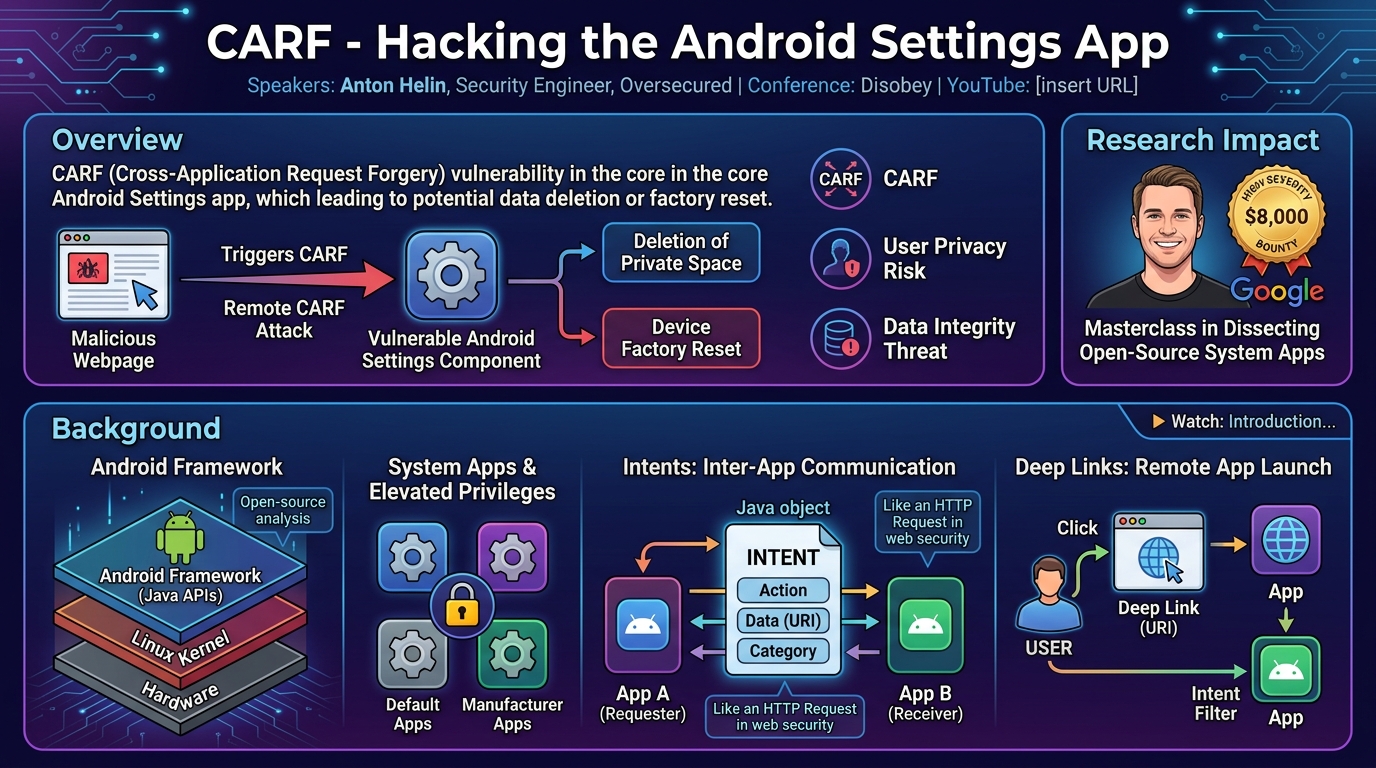
In this insightful talk, Anton Helin, a security engineer at Oversecured, dissects a sophisticated vulnerability he uncovered within the fundamental Android Settings application. Titled "CARF - Hacking the Android Settings App," the presentation details a Cross-Application Request Forgery (CARF) vulnerability that allowed for the remote deletion of a user's private space or even a full factory reset of the device with minimal user interaction. Helin's research highlights critical flaws in how Android applications, particularly privileged system components, process incoming data from Intents and deep links.
Key moments
- 0:00 Introduction to Android settings app hacking
- 2:00 Understanding the open-source Android framework
- 3:30 Discovering a high-severity Android settings bug ($8k bounty)
- 4:30 Defining Cross-Application Request Forgery (CARF)
- 5:00 Intents: The core mechanism for Android app attacks
- 7:30 Remote attack vectors via Android deep links
- 8:45 Anatomy of an Android Intent URI
CARF - Hacking the Android Settings App
Speakers: Anton Helin, Security Engineer, Oversecured
Conference: Disobey
YouTube: https://www.youtube.com/watch?v=IBEAjl1ulH8
Overview
In this insightful talk, Anton Helin, a security engineer at Oversecured, dissects a sophisticated vulnerability he uncovered within the fundamental Android Settings application. Titled "CARF - Hacking the Android Settings App," the presentation details a Cross-Application Request Forgery (CARF) vulnerability that allowed for the remote deletion of a user's private space or even a full factory reset of the device with minimal user interaction. Helin's research highlights critical flaws in how Android applications, particularly privileged system components, process incoming data from Intents and deep links.
Helin's work is particularly significant because it targets the Android framework itself, a layer that underpins all applications and often operates with elevated privileges. Unlike traditional mobile hacking that might involve reverse engineering opaque binaries, the Android framework is open source, allowing for direct code analysis. This talk serves as a masterclass in dissecting open-source system applications, revealing how seemingly robust validation mechanisms can be bypassed through a deep understanding of component lifecycle and inter-app communication. The vulnerability, which Google classified as high severity and awarded an $8,000 bounty for, underscores the continuous need for stringent security practices even in core operating system components.
The implications of this CARF vulnerability are substantial for both users and developers. For users, the ability for a malicious webpage to trigger a factory reset or delete sensitive data from a secure "private space" without explicit consent represents a severe privacy and data integrity risk. For developers, Helin's findings provide crucial lessons on the dangers of relying solely on intent filters for security, the complexities of intent processing across different activity lifecycle methods, and the subtle but powerful bypasses enabled by features like selectors. It emphasizes that all external input, even seemingly benign URI parameters, must be treated with extreme caution and validated rigorously.
Background
▶ Watch: Introduction to Android settings app hacking (0:00)
The Android operating system, at its core, is a layered architecture. Anton Helin's talk focuses on the Android framework, which sits above the kernel and provides the Java API that applications interact with. Unlike lower-level kernel or binary hacking, the framework is largely open source, allowing security researchers to examine its code directly for vulnerabilities. Within this framework reside system apps, which are built much like regular applications but possess elevated privileges, often managing core device functionalities. Manufacturers like Samsung further augment these with their proprietary system apps, increasing the attack surface.
Central to Android's inter-app communication is the concept of an Intent. Helin aptly describes an Intent as analogous to an HTTP request in web security. It's a Java object that allows one application to request an action from another, or even from within itself. An Intent typically specifies an action (what to do), data (e.g., a URI), and a category. For instance, an app wanting to open a web page sends an Intent containing the URL; a browser app, having registered an intent filter for web URLs, receives this Intent and launches the page. Intents can be restricted by permissions, but their fundamental role is to facilitate seamless, controlled interaction between disparate applications.
While Intents primarily handle local inter-app communication, they can also be initiated remotely through deep links. A deep link is a URI (Uniform Resource Identifier) that, when clicked in a web browser, can be intercepted by the Android operating system and used to launch a specific application component instead of being processed by the browser itself. This is a common feature, seen when clicking a YouTube link opens the YouTube app. Crucially, Intents themselves can be represented in a URI form (e.g., intent://...), allowing for complex Intent structures to be triggered from a web context, albeit with certain browser-dependent restrictions and often requiring user interaction.
Every Android application includes an Android Manifest file, an XML configuration that declares the app's components (like Activities and Fragments), permissions, and intent filters. A key attribute within the manifest is exported. If exported is set to true for an Activity, it means other applications can launch that component. An intent filter defines the types of Intents a component can receive, specifying actions, categories, and data schemes. However, Helin emphasizes a critical point: intent filters are primarily for routing and discovery, not for security. They inform other apps what kind of Intents a component can handle, but they do not inherently block malicious Intents from being sent or processed if other security checks are absent.
Activities represent a single screen with a user interface, while Fragments are modular sections of an Activity, often used to manage a portion of the UI or encapsulate specific functionality. When an Activity is launched, its onCreate method is called, which often processes the initial Intent. If the Activity is already running and receives a new Intent, the onNewIntent method is called instead, which can lead to different processing logic. This distinction proves crucial in Helin's exploit. The vulnerability, which Helin dubs Cross-Application Request Forgery (CARF), arises when a malicious application (or a remote web page via deep link) can craft an Intent that tricks a victim application into performing a sensitive, internal action without the user's explicit consent, analogous to how Cross-Site Request Forgery (CSRF) works in web applications.
Key Findings
▶ Watch: Discovering a high-severity Android settings bug ($8k bounty) (3:30)
Anton Helin's primary finding was a CARF vulnerability in the Android Settings app, specifically targeting the MobileNetworkActivity. This activity, responsible for displaying mobile data settings, was found to be vulnerable to a series of bypasses that, when chained together, allowed an attacker to remotely trigger highly sensitive actions.
The initial investigation focused on MobileNetworkActivity's handling of incoming Intents. Helin observed that this activity, like many others in the Settings app, extends SettingsActivity, a parent class providing generic functionality. The onCreate method, which runs when the activity is first launched, uses data from the incoming Intent to determine which Fragment to display. Critically, the fragment name was found to be an attacker-controlled extra in the Intent.
However, a direct injection of a restricted fragment name initially failed. The SettingsActivity's getIntent method, which onCreate calls, performs robust validation. It overrides any attacker-supplied fragment name with a legitimate one derived from the activity's metadata, effectively preventing arbitrary fragment launching on the first Intent delivery. This strong check meant a simple single-click remote exploit was not possible via the onCreate path.
Helin's breakthrough came from understanding the Android activity lifecycle, specifically the onNewIntent method. This method is invoked when an activity is already running and receives a subsequent Intent, rather than being recreated. Crucially, MobileNetworkActivity's onNewIntent method calls createUIFromIntent (the same method onCreate uses) but does not call getIntent. This meant the robust validation in getIntent could be bypassed if a second, malicious Intent was delivered to an already running MobileNetworkActivity.
The next challenge was to bypass the convertIntent method, which onNewIntent does call. convertIntent performs its own validation based on the Intent's action. If the action matches a known action, it performs a conversion; otherwise, it returns null. If convertIntent returns null, the validation logic is skipped, and the original, attacker-controlled Intent is processed. Helin discovered that by supplying an action that doesn't match any of the converter's expected actions, the convertIntent method would return null, effectively disabling its validation.
To make this non-matching action still trigger the MobileNetworkActivity (which has its own intent filter specifying valid actions), Helin leveraged Selectors. A Selector is an Android feature that allows an Intent to contain a nested Intent. The outer Intent, with a fake action, can pass through convertIntent to return null. The inner Intent (the Selector) can then contain a valid action that matches the MobileNetworkActivity's intent filter, allowing the component to be launched in the first place. This multi-layered approach meant the victim had to click a malicious link twice: once to launch MobileNetworkActivity (triggering onCreate), and a second time to deliver the malicious Intent via onNewIntent (bypassing getIntent's validation and convertIntent's validation via the fake action and selector).
With arbitrary fragment injection achieved, Helin then sought high-impact fragments. He identified two critical targets:
MainClearandMainClearConfirm: These fragments are responsible for initiating a factory reset of the device. WhileMainClearConfirmrequired an extra click, launchingMainCleardirectly would bypass initial steps. However, testing revealed a graphical resource error, causing a crash due to unmet fragment launch requirements.PrivateSpaceDeletionProgressFragment: This fragment is designed to initiate and track the deletion of a user's private space – a highly secure, un-backed-up area for sensitive data. Crucially, this fragment'sonCreateViewmethod directly calls themAndDeletePrivateSpace()function, meaning launching it automatically triggers the deletion without further user confirmation within that specific fragment. This was the ultimate high-impact target.
The full exploit chain enabled remote deletion of a private space with two clicks. While Chrome's stricter handling of intent:// URIs and selectors prevented direct exploitation, Firefox and Android's default HTML viewer (accessible via Gmail for HTML email attachments) were found to be vulnerable. Google ultimately awarded an $8,000 bounty, rating it as high severity due to the high user interaction required for the remote attack using Google products, but acknowledging the critical impact on Firefox.
Technical Deep Dive
▶ Watch: Defining Cross-Application Request Forgery (CARF) (4:30)
The core of this vulnerability lies in the intricate dance between Intents, Activities, Fragments, and the Android lifecycle methods, specifically within the highly privileged Settings application.
An Intent is an abstract description of an operation to be performed. It's a fundamental message object used to request an action from another app component. Key attributes include:
package: The target application's package name.component: The specificActivity,Service, orBroadcastReceiverto launch.action: A string describing the generic action to be performed (e.g.,android.intent.action.VIEW).data: A URI pointing to the data to be acted upon.extras: ABundleof additional key-value pairs.scheme: Part of the URI, often used for deep linking (e.g.,http,https,youtube).
The Android Manifest file (AndroidManifest.xml) declares an app's components. For an Activity like MobileNetworkActivity, its entry might look like this:
The android:exported="true" attribute is critical, as it allows external applications to launch this Activity. The <intent-filter> specifies what kinds of Intents this Activity is willing to receive. Helin's crucial insight here is that intent filters are not security features; they guide the Android system in routing Intents but do not prevent an exported component from receiving and processing an Intent that doesn't perfectly match its filter if the Intent is delivered directly by component name.
The MobileNetworkActivity extends SettingsActivity, which provides a common base for many settings screens. When MobileNetworkActivity is first launched by an Intent (e.g., via a deep link), the onCreate method is executed. Inside onCreate, the getIntent() method is called to retrieve the launching Intent. The SettingsActivity's implementation of getIntent() is robust:
This getIntent() method explicitly retrieves the FRAGMENT_CLASS from the meta-data tag in the AndroidManifest.xml and overrides any ":settings:fragment_name" extra that an attacker might have injected into the Intent. This prevents an attacker from specifying an arbitrary fragment on the initial launch.
The key to bypassing this strong validation lies in the onNewIntent method. If MobileNetworkActivity is already running (e.g., in the background after the first click), and a new Intent is sent to it, the onNewIntent method is called instead of onCreate. The MobileNetworkActivity overrides onNewIntent as follows:
Crucially, onNewIntent does not call getIntent(). Instead, it directly passes the new Intent to createUIFromIntent(intent). This means the robust fragment name validation performed in getIntent() is entirely skipped for subsequent Intents.
However, onNewIntent does perform another form of validation via the convertIntent method, which is part of the IntentConverter class. This method checks the action of the incoming Intent.
If the action in the Intent doesn't match any of the predefined cases, convertIntent returns null. The onNewIntent logic then checks this return value: if convertedIntent is null, it proceeds with the original, unvalidated Intent. This allows an attacker to supply a "fake" action that causes convertIntent to return null, effectively disabling this layer of validation.
To ensure the MobileNetworkActivity is still launched despite having a fake action in the primary Intent, Helin utilized Selectors. An intent:// URI can embed a selector parameter, which itself contains another Intent URI. The outer Intent (with the fake action and the malicious fragment name) is what's processed by convertIntent and then createUIFromIntent. The inner Intent (the selector) is what the Android system uses to match the intent filter of the MobileNetworkActivity for initial dispatch.
The final malicious URI structure looks like this:
intent://settings.android.com#Intent;action=FAKE_ACTION;package=com.android.settings;component=com.android.settings.network.MobileNetworkActivity;S.:settings:fragment_name=com.android.settings.privatespace.PrivateSpaceDeletionProgressFragment;end;S.android.intent.extra.REFERRER_NAME=android-app://com.google.android.gm;end;selector=intent://settings.android.com#Intent;action=android.settings.NETWORK_OPERATOR_SETTINGS;end
Breaking it down:
intent://settings.android.com: The base URI scheme and host.action=FAKE_ACTION: This is the arbitrary action that causesconvertIntentto returnnull.package=com.android.settings;component=com.android.settings.network.MobileNetworkActivity;: Specifies the target application and activity.S.:settings:fragment_name=com.android.settings.privatespace.PrivateSpaceDeletionProgressFragment;: This is the injected, malicious fragment name. TheS.prefix denotes a string extra.selector=intent://...;action=android.settings.NETWORK_OPERATOR_SETTINGS;end: This is the nested Intent within the selector. Its action,android.settings.NETWORK_OPERATOR_SETTINGS, matches theMobileNetworkActivity'sintent filter, allowing the Android system to initially route the Intent to this activity.
When this URI is clicked twice:
- First click (browser ->
MobileNetworkActivity): Theselectormatches theintent filter, launchingMobileNetworkActivity. TheonCreatemethod is called.getIntent()performs its validation, overriding the attacker'sfragment_namewith the legitimateMobileNetworkFragmentclass from metadata. The user sees the benign mobile network settings screen. - Second click (browser ->
MobileNetworkActivity): SinceMobileNetworkActivityis already running,onNewIntentis called.
onNewIntentcallsconvertIntentwith the primary Intent (containingFAKE_ACTION).convertIntentreturnsnullbecauseFAKE_ACTIONdoesn't match any known actions.onNewIntentthen proceeds with the original, unvalidated Intent.- This Intent, still containing
S.:settings:fragment_name=com.android.settings.privatespace.PrivateSpaceDeletionProgressFragment, is passed tocreateUIFromIntent. createUIFromIntentlaunchesPrivateSpaceDeletionProgressFragment.
The PrivateSpaceDeletionProgressFragment itself contains the vulnerability:
As soon as PrivateSpaceDeletionProgressFragment is created and its onCreateView method runs, the mAndDeletePrivateSpace() function is invoked, leading to the immediate and unconfirmed deletion of the user's private space. The lack of an explicit confirmation step within this specific fragment makes it a critical target.
Demo / Proof of Concept
▶ Watch: Remote attack vectors via Android deep links (7:30)
Anton Helin demonstrated the CARF vulnerability with a compelling proof of concept, showcasing the remote deletion of an Android user's private space. The exploit leverages a specially crafted intent:// URI embedded in a web page, requiring two clicks from the victim.
The demonstration begins with the creation of a private space on an Android device, populating it with some sample data to illustrate its functionality as a secure, isolated environment. The private space is then locked with a separate passcode, highlighting its intended high-security design.
The core of the PoC is a web page containing a malicious link. When this link is presented to the victim:
- First Click: The victim clicks the link. The Android operating system, guided by the
selectorpart of theintent://URI, routes the Intent to theMobileNetworkActivitywithin the Settings app. The Settings app opens, displaying the mobile network settings screen. At this stage, no malicious action has occurred, and the user might simply dismiss it as an accidental or benign redirection. TheMobileNetworkActivityis now running in the background.
- Second Click: The victim returns to the browser and clicks the same link again. Because the
MobileNetworkActivityis already running, the system calls itsonNewIntentmethod. This second Intent, carrying the attacker-controlledPrivateSpaceDeletionProgressFragmentname and a fake action (which bypasses theconvertIntentvalidation), is processed. ThePrivateSpaceDeletionProgressFragmentis then launched.
Upon the launch of PrivateSpaceDeletionProgressFragment, its onCreateView method executes, which directly calls the mAndDeletePrivateSpace() function. This instantly initiates and completes the deletion of the user's private space without any further prompts or confirmation dialogs. The demonstration concludes by showing a toast message confirming the deletion and verifying that the private space is indeed gone from the device's settings, along with all its contents.
Helin explicitly addressed browser compatibility. He noted that Google Chrome, due to its stricter parsing and security policies regarding intent:// URIs and selectors, prevents this remote attack vector. For a remote attack to succeed using Google products, a more complex chain was required: the victim would need to open an HTML document (e.g., via a Gmail attachment) in Android's default HTML viewer. The HTML viewer, unlike Chrome, does permit the use of selectors in intent:// links, allowing the two-click remote exploit to function. While this scenario increases user interaction, Helin successfully demonstrated it in the video, showing an email opened in Gmail, then selecting the HTML viewer, followed by the two clicks to delete the private space.
Crucially, Mozilla Firefox on Android was shown to fully support the intent:// URI with selectors, enabling the two-click remote deletion directly from a malicious web page in the browser. This highlights the varying security postures of different browsers and underscores the broader impact of the vulnerability beyond Google's ecosystem.
Defensive Implications
▶ Watch: Anatomy of an Android Intent URI (8:45)
Anton Helin's findings provide critical insights for both Android platform developers and application security engineers. The vulnerabilities uncovered demonstrate that even core system applications, built with seemingly robust validation, can harbor significant flaws when intricate inter-app communication mechanisms are not fully secured.
- Intent Filters Are Not Security Boundaries: The most prominent defensive implication is a reinforcement of the principle that intent filters are primarily for routing and discovery, not for security. Developers should never assume that an
intent-filterwill prevent malicious or malformed Intents from reaching anexportedcomponent. All data received via an Intent, regardless of whether it perfectly matches anintent-filter, must be treated as untrusted input and subjected to rigorous validation.
- Thorough Input Validation for All Intent Data: Every piece of data extracted from an Intent, especially
extrasor URI parameters, must be explicitly validated. This includes checking data types, ranges, content, and ensuring that sensitive actions are only triggered by trusted and confirmed inputs. Relying on implicit validation or the assumption that only "correct" Intents will be received is a critical mistake.
- Beware of Activity Lifecycle Discrepancies (
onCreatevs.onNewIntent): The exploit's success hinged on the difference in validation logic betweenonCreate(which callsgetIntentwith strong checks) andonNewIntent(which bypassesgetIntent). Developers must ensure that security-critical validation logic is applied consistently across all relevant lifecycle methods that process incoming Intents. IfonCreateneeds to perform a specific validation,onNewIntent(and any other method handling subsequent Intents) must perform an equivalent or stronger check.
- Careful Handling of
convertIntentReturn Values: TheconvertIntentmethod's ability to returnnulland thus skip validation was a key bypass. Developers implementing similar conversion or filtering logic should carefully consider the security implications of returningnullor default values. Ifnullimplies "skip validation," this path must be explicitly secured or removed.
- Restrict Direct Execution of Sensitive Actions in Fragments: The
PrivateSpaceDeletionProgressFragmentdirectly callingmAndDeletePrivateSpace()in itsonCreateViewmethod without further confirmation was a critical design flaw. Sensitive actions, especially those with irreversible consequences like data deletion or factory resets, should always require explicit user confirmation (e.g., a dedicated "Are you sure?" dialog) and should ideally be protected by additional authentication checks or permissions, even when triggered by an internal component.
- Review
exported=trueComponents Rigorously: AnyActivity,Service, orBroadcastReceivermarked withandroid:exported="true"is an attack surface. Security audits should pay particular attention to these components, examining every possible Intent they can receive and how that data is processed. Consider settingexported="false"by default unless absolutely necessary for inter-app communication.
- Browser Security Policies for
intent://URIs: While not directly controllable by app developers, browser vendors (like Chrome) play a crucial role in mitigating remoteintent://attacks. Stricter policies regarding the parsing and launching ofintent://URIs, especially those containingselectorsor complexextras, can significantly reduce the remote attack surface. Users should be aware that different browsers may have different security postures regarding deep links.
- Least Privilege for System Apps: Even system apps, which inherently have elevated privileges, should adhere to the principle of least privilege. Their components should not expose functionalities that can be abused without proper authorization and validation, even if those functionalities are intended for internal use.
Key Takeaways
- CARF (Cross-Application Request Forgery) is a potent attack vector on Android, allowing malicious apps or web pages to force privileged actions in victim applications.
- Android Intent filters are for routing, not security. They guide the system in delivering Intents but do not prevent an
exportedcomponent from receiving and processing untrusted data. - Activity lifecycle methods (
onCreatevs.onNewIntent) can have divergent security implications. Validation logic must be consistently applied across all paths that process incoming Intents. - The use of
Selectorsinintent://URIs can bypass action-based validation, allowing an attacker to match anintent-filterwhile simultaneously injecting a malicious, unvalidated action into the primary Intent. - Sensitive actions should always require explicit user confirmation and robust authorization, even when triggered by internal components or specific fragments, to prevent silent exploitation.
- Browser security policies regarding
intent://URIs andselectorsvary, impacting the remote exploitability. Chrome is more restrictive, while Firefox and the default HTML viewer were found to be vulnerable in this case.
About the Speaker(s)
Anton Helin is a Security Engineer at Oversecured, a company specializing in automatic vulnerability detection for mobile applications. In his role, he applies his experience as a mobile hacker to enhance the capabilities of their security tools, working alongside Sergey Toshin, a renowned bug bounty hunter in Google Play and Samsung programs.
Helin's career background includes freelance consulting, app development for the Finnish National Railway, and several years at 2NS Cyber Security, where he honed his skills in both web and mobile security. He possesses significant Android bug bounty experience with Google, earning him a place in the Google Hall of Fame for his contributions. Anton holds a Master's degree in Computer Science from Aalto University in Finland, complementing his foundational education in electrical engineering. His expertise lies in dissecting complex mobile frameworks and uncovering subtle, yet high-impact, vulnerabilities.
Reviews
Dr. Zero (Offensive Security Researcher) — STRONG ACCEPT
Helin presents original, self-discovered research with a clean exploit chain against a privileged Android system component — exactly the kind of work that earns a conference slot. The $8K bounty undersells the technical elegance here: lifecycle bypass + selector abuse + fragment injection is a well-constructed three-stage chain, not a one-trick CVE.
Heather Calloway (CISO) — WEAK
Technically credible research with a real impact — private space deletion via a two-click remote chain is not trivial. But this talk never leaves the exploit layer. There is no governance angle, no institutional accountability, no defender path for anyone who isn't an Android platform engineer.