Sudos and Sudon’ts: Peering inside Sudo for Windows
Michael Torres
DEF CON 32 Main Stage · Day 1 · Main Stage
Overview
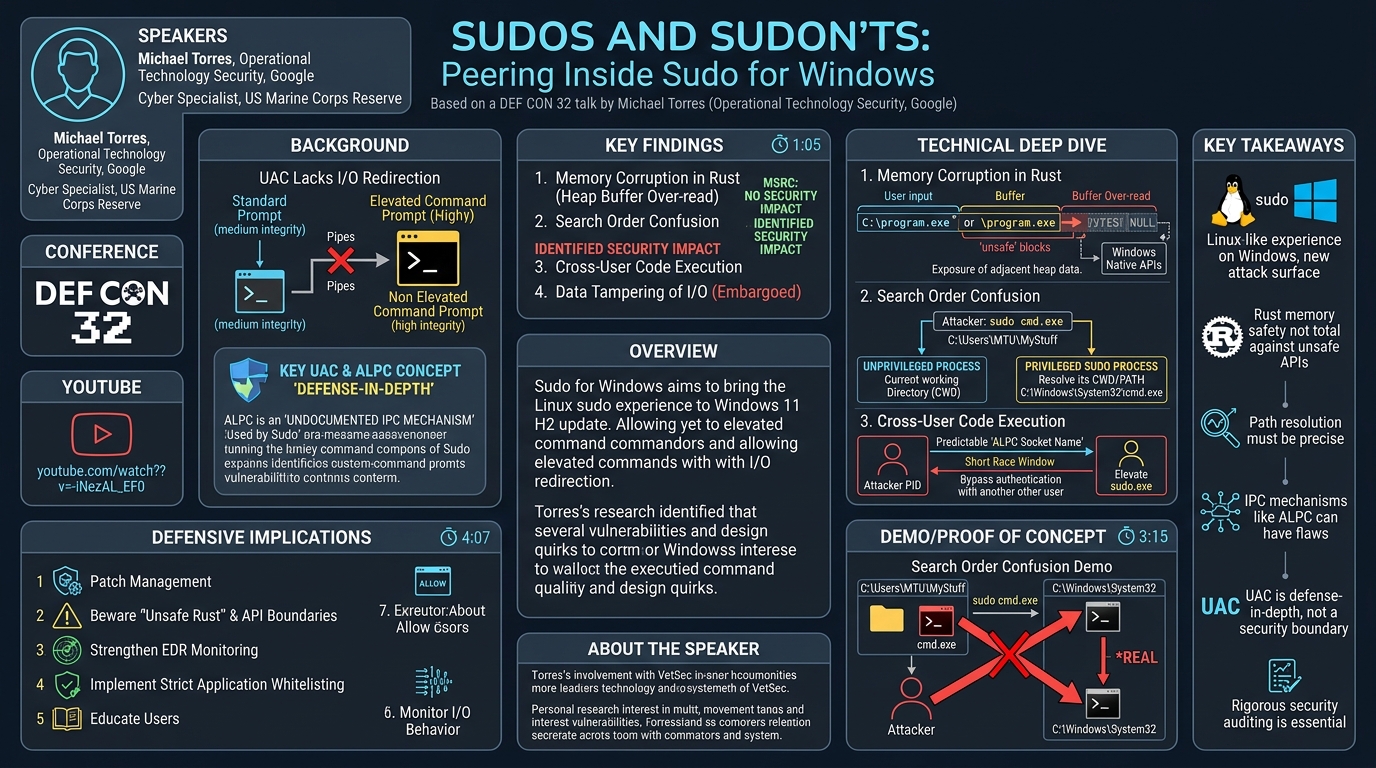
Michael Torres's DEF CON 32 presentation, "Sudos and Sudon’ts: Peering inside Sudo for Windows," delves into the security implications of Microsoft's new Sudo for Windows utility. This tool, slated for release in the Windows 11 H2 update, aims to bring the familiar Linux sudo experience—allowing users to run commands with elevated privileges while maintaining standard input/output redirection—to the Windows command line. Torres, an Operational Technology Security expert at Google and a cyber specialist with the US Marine Corps Reserve, conducted extensive research on early preview versions of Sudo for Windows, uncovering several vulnerabilities and design quirks.
Key moments
- 0:00 Introduction and talk agenda for Sudo for Windows
- 1:05 Explaining Microsoft's Sudo for Windows utility
- 2:00 Overview of non-security and security issues discovered
- 3:15 Understanding User Account Control (UAC) and its limitations
- 4:07 The undocumented ALPC interprocess communications framework
Sudos and Sudon’ts: Peering inside Sudo for Windows
Speakers: Michael Torres, Operational Technology Security, Google
Conference: DEF CON 32
YouTube: https://www.youtube.com/watch?v=-iNezAL_EF0
Overview
Michael Torres's DEF CON 32 presentation, "Sudos and Sudon’ts: Peering inside Sudo for Windows," delves into the security implications of Microsoft's new Sudo for Windows utility. This tool, slated for release in the Windows 11 H2 update, aims to bring the familiar Linux sudo experience—allowing users to run commands with elevated privileges while maintaining standard input/output redirection—to the Windows command line. Torres, an Operational Technology Security expert at Google and a cyber specialist with the US Marine Corps Reserve, conducted extensive research on early preview versions of Sudo for Windows, uncovering several vulnerabilities and design quirks.
The talk is particularly significant because it scrutinizes a foundational new operating system utility, developed in Rust, that bridges the gap between unprivileged and privileged processes. Torres's findings highlight the challenges of securely implementing such a critical component, especially when interacting with complex, often undocumented, Windows APIs. His research not only exposed potential security flaws but also shed light on Microsoft's internal security classifications for different types of issues, including those deemed "no security impact" despite their technical underpinnings.
Torres’s analysis provides crucial insights for both Windows administrators and security researchers. For administrators, it offers an early look at the potential risks and best practices for deploying and managing Sudo for Windows. For researchers, it demonstrates how even modern, memory-safe languages like Rust can introduce vulnerabilities when interfacing with legacy or "unsafe" system components, underscoring the continuous need for rigorous security auditing of new software, regardless of its development language or open-source status.
Background
▶ Watch: Introduction and talk agenda for Sudo for Windows (0:00)
The introduction of Sudo for Windows addresses a long-standing limitation in the Windows operating system related to User Account Control (UAC). UAC, a core security feature since Windows Vista, operates as a defense-in-depth mechanism, not a primary security boundary. Its purpose is to prevent unauthorized changes to the system by requiring administrative approval for actions that could affect other users or the system's security. When a user attempts to run an administrative task, UAC prompts for elevation. If approved, the process runs in high integrity, granting it the necessary permissions. Conversely, most user applications run in medium integrity, with limited access to system resources.
A critical aspect of UAC, and the primary driver for Sudo for Windows, is its inability to directly inherit standard input (stdin), standard output (stdout), and standard error (stderr) streams from an unprivileged process into an elevated one. This means that if a user in a standard command prompt attempts to run an elevated command like reg query and pipe its output to another command or redirect it to a file, the elevated process would spawn in a new, isolated window, preventing the desired I/O redirection. Sudo for Windows aims to overcome this by acting as an intermediary, facilitating the seamless transfer of console input and output between the unprivileged calling process and the privileged target process.
To achieve this, Sudo for Windows relies heavily on the Advanced Local Procedure Call (ALPC) interface, an interprocess communication (IPC) framework primarily used by Microsoft's internal systems and officially undocumented. ALPC allows a server process to listen on a named port (an object, often a string or GUID) and a client process to connect to it. Security for ALPC connections is typically managed by allowing the server to query client attributes (like process ID, SID, principal name) and allowing the client to specify which server attributes it trusts. Prior to Torres's research, a Google coworker had already identified and reported a critical flaw where the ALPC server in Sudo for Windows initially had zero authentication, allowing any process to request elevated commands. This specific vulnerability was addressed by Microsoft before Torres began his deeper investigation, with an authentication check added to verify that both the client and server processes were indeed sudo.exe.
Key Findings
▶ Watch: Explaining Microsoft's Sudo for Windows utility (1:05)
Michael Torres's comprehensive analysis of Sudo for Windows version one (distinguished by signature dates of February and March, as Microsoft did not increment the version number) yielded four distinct issues, two of which Microsoft's Security Response Center (MSRC) classified as having "no security impact," and two with clear security implications.
The issues deemed by MSRC to have no direct security impact were:
- Memory Corruption Issue (in Rust): A buffer over-read vulnerability in the heap, stemming from the way Sudo for Windows handled paths with leading slashes or drive letters when calling Windows native APIs. While written in Rust, a language known for its memory safety, this flaw demonstrated how interactions with unsafe C-style APIs could reintroduce memory corruption.
- Search Order Confusion Issue: A logical flaw in how Sudo for Windows resolved command paths. Instead of resolving the path in the context of the unprivileged calling process, it attempted resolution within the privileged process's current working directory, which could differ, leading to the execution of an unintended binary.
The issues with identified security impact were:
- Cross-User Code Execution: A vulnerability allowing an unprivileged user to execute code as another user who had initiated a Sudo for Windows session. This exploit leveraged the predictable naming of the ALPC server socket and potential weaknesses in the authentication mechanism, even after Microsoft's initial fixes.
- Data Tampering of Input and Output Data: This critical vulnerability allowed an attacker to manipulate the data streams flowing between the unprivileged process and the elevated command. Due to ongoing embargo restrictions at the time of the talk, specific technical details of this finding could not be disclosed.
Technical Deep Dive
▶ Watch: Overview of non-security and security issues discovered (2:00)
Torres's research exposed the intricacies and potential pitfalls of implementing a security-sensitive utility like Sudo for Windows.
Memory Corruption in Rust
Perhaps one of the most surprising findings was a memory corruption issue within a program written in Rust, a language celebrated for its strong memory safety guarantees. This particular vulnerability arose when Sudo for Windows interfaced with Windows native APIs, which often require the use of unsafe blocks in Rust to call C-style functions. Torres discovered that if a user provided a command path that began with a leading backslash (e.g., \program.exe) or a drive letter (e.g., C:\program.exe), the internal path handling mechanism would write this path to the start of a buffer. However, when subsequently passed to an API function, the system would read beyond the intended end of the user-supplied path until it encountered the first null byte.
This led to a buffer over-read on the heap, allowing the program to read an arbitrary number of bytes from adjacent memory allocations. While the attacker couldn't directly control the specific heap allocation being read or write arbitrary memory (due to Rust's vector reallocation behavior), this flaw could expose data from previous heap allocations. Torres demonstrated this using Process Monitor, showing a CreateFile operation attempting to read a path composed of the user's input concatenated with data from a prior heap allocation (e.g., a previous current working directory path) and then garbage bytes until a null terminator. This highlights a crucial takeaway: while Rust prevents many common memory safety issues, developers must exercise extreme caution when using unsafe code to interact with external, C-based APIs, as the safety guarantees of Rust do not extend across this boundary.
Search Order Confusion
The search order confusion vulnerability stemmed from a logical flaw in how Sudo for Windows resolved the path of the command to be executed. In Windows, when a command is run without an explicit path, the system is designed to first look for the executable in the current working directory (CWD) and then traverse the system's PATH environment variable. Sudo for Windows, however, deviated from this expected behavior.
When an unprivileged process requested Sudo to execute a command (e.g., sudo program.exe), the path resolution for program.exe occurred in the context of the privileged Sudo process. This privileged process often had a different CWD than the unprivileged calling process. Consequently, if an attacker placed a malicious program.exe in their current directory and then invoked sudo program.exe, Sudo might instead execute a different program.exe located in the privileged process's CWD or earlier in its PATH environment variable (e.g., C:\Windows\System32\program.exe). Torres provided a "somewhat contrived example" where running sudo cmd.exe would execute the system's cmd.exe instead of a user-supplied one in the current directory. Although Microsoft initially classified this as "not a vulnerability," they subsequently implemented a fix. The solution involved having the unprivileged process resolve the full, absolute path of the command before passing it to the privileged Sudo process, ensuring that the intended executable is always launched.
Cross-User Code Execution
The cross-user code execution vulnerability represented a significant security impact, allowing an unprivileged user to run commands as another user who had already initiated a Sudo session. This attack vector leveraged the ALPC (Advanced Local Procedure Call) interface, which Sudo for Windows uses for interprocess communication.
Torres explained that the ALPC server's socket name is predictably generated using the unprivileged process ID of the user who invoked sudo. This predictability means that if an attacker knows the PID of another user's active sudo process, they can attempt to connect to that user's ALPC server. While Microsoft had implemented an authentication check (following prior research by James Forshaw) that verified both the client and server process paths were sudo.exe, this check alone proved insufficient to prevent cross-user execution. The core issue likely lies in the fact that this path-based authentication might not explicitly verify the user identity (SID) of the connecting client. If an unprivileged user could connect to another user's sudo.exe ALPC server and mimic a legitimate sudo.exe client, they could potentially inject commands. Torres alluded to a race condition in the elevation request API that he had to exploit by repeatedly running commands, suggesting a timing window in the authentication or state management. Although he noted that Microsoft had made this race window "really short" and didn't consider it a security control, the existence of a "cross-user code execution" vulnerability implies that sufficient conditions existed for an attacker to bypass the intended isolation and execute code in the context of another user's elevated session. This is a critical flaw, as it undermines the principle of least privilege and user separation.
Data Tampering of Input and Output Data
The fourth major finding was a vulnerability allowing data tampering of input and output data for Sudo for Windows. Unfortunately, due to ongoing embargo restrictions at the time of the DEF CON talk, Torres was unable to provide specific technical details about this issue. However, the nature of the vulnerability suggests that an attacker could intercept or modify the data streams that Sudo for Windows is designed to seamlessly pipe between the unprivileged console and the elevated process. This could have severe implications, potentially allowing an attacker to inject malicious commands, alter the output of legitimate commands to mislead the user, or exfiltrate sensitive data that passes through the Sudo session. This type of vulnerability directly attacks the core functionality and trust model of Sudo for Windows, making it particularly dangerous.
Demo / Proof of Concept
▶ Watch: Understanding User Account Control (UAC) and its limitations (3:15)
While the talk did not feature a live, step-by-step exploit demonstration for all vulnerabilities, Michael Torres effectively illustrated the search order confusion issue. He described a scenario where a user attempts to run sudo cmd.exe from their current working directory (C:\Users\MTU\MyStuff). The expectation is that if a custom cmd.exe (perhaps a malicious or modified one) exists in MyStuff, it should be executed. However, due to the path resolution occurring in the privileged Sudo process's context, the system's cmd.exe from C:\Windows\System32 would be launched instead.
Torres presented a diagram (18:00) to visually explain this behavior, showing an attacker running command.exe and expecting their custom binary, but instead, the system's command.exe is run in the privileged process path. This demonstration highlighted how seemingly innocuous path resolution logic could lead to unexpected program execution, potentially bypassing user intent or security controls. He also showed the setup of a victim user (MTU) and an unprivileged user, confirming sudo functionality and the unprivileged state of the base prompt, setting the stage for understanding the cross-user implications, even if a direct exploit was not fully walked through.
Defensive Implications
▶ Watch: The undocumented ALPC interprocess communications framework (4:07)
The findings from "Sudos and Sudon’ts" offer several crucial defensive implications for organizations and individual users running Windows 11 with Sudo for Windows:
- Patch Management is Paramount: As a new and critical operating system utility, Sudo for Windows will likely undergo continuous security improvements. Organizations must prioritize applying Windows updates promptly to ensure they receive fixes for vulnerabilities like the search order confusion, cross-user code execution, and the embargoed data tampering issue as soon as they are released.
- Beware of "Unsafe Rust" and API Boundaries: The memory corruption finding in Rust code serves as a stark reminder that even languages designed for memory safety can be vulnerable when interacting with "unsafe" or low-level system APIs. Defenders should be aware that new software, even if written in modern languages, requires thorough security auditing, especially at the boundaries where it interfaces with the operating system's native functions.
- Strengthen Endpoint Detection and Response (EDR): The predictable ALPC socket names and potential for cross-user code execution highlight the importance of robust EDR solutions. Defenders should monitor for unusual ALPC connections, processes attempting to interact with other users'
sudo.exeprocesses, or unexpected process parent-child relationships that could indicate a privilege escalation attempt. - Implement Strict Application Whitelisting: To mitigate the risk of search order confusion and general unexpected program execution, organizations should implement and enforce application whitelisting policies. This ensures that only approved executables can run, preventing malicious binaries (even those with legitimate-sounding names like
cmd.exe) from being inadvertently executed through path resolution ambiguities. - Educate Users on UAC and Sudo for Windows: Users should understand that UAC is a defense-in-depth measure, not an impenetrable barrier. While Sudo for Windows enhances usability, it also introduces a new attack surface. Users should be cautious about what commands they run with
sudoand be aware of the potential for unexpected behavior, especially with ambiguous paths. - Monitor for Unexpected I/O Behavior: The data tampering vulnerability, once publicly detailed, will likely necessitate specific monitoring for anomalies in standard input/output streams when
sudois in use. This could involve checking for unexpected characters, commands, or data modifications within console sessions.
Key Takeaways
- Sudo for Windows brings Linux-like command elevation with I/O redirection to Windows, addressing a long-standing UAC limitation, but introduces new attack surfaces.
- Even memory-safe languages like Rust can be susceptible to memory corruption vulnerabilities when interacting with low-level, unsafe Windows native APIs.
- Path resolution logic in privileged processes must be carefully implemented to prevent "search order confusion" and ensure the correct command is executed.
- Inter-process communication (IPC) mechanisms like ALPC, especially when undocumented and using predictable naming schemes, can be a source of critical security vulnerabilities like cross-user code execution.
- Microsoft classifies UAC as a defense-in-depth measure, not a primary security control, meaning UAC bypasses are not typically considered security issues by MSRC.
- New operating system utilities, regardless of their open-source status or development language, require rigorous security auditing to identify and remediate subtle flaws that can have significant security impacts.
About the Speaker(s)
Michael Torres is a security professional specializing in Operational Technology (OT) security at Google. Beyond his corporate role, he serves in the United States Marine Corps Reserve, contributing his expertise in the cyber domain. Torres is also deeply involved in the community, volunteering his time with VetSec, a non-profit organization dedicated to assisting veterans of the US armed services and allied countries in launching careers in cybersecurity. His passion for security research extends to independent projects like his work on Sudo for Windows, which he undertakes out of personal interest and a commitment to advancing the field.
Reviews
Dr. Zero (Offensive Security Researcher) — MUST SEE
This talk delivers a brutally honest and technically profound dissection of Microsoft's new Sudo for Windows utility. Torres conducted original, deep-dive research into a foundational operating system component, uncovering multiple critical vulnerabilities, including memory corruption in Rust, cross-user code execution via ALPC, and data tampering. His work provides invaluable, actionable insights for both administrators and security researchers, challenging assumptions about memory-safe languages and exposing the real-world implications of subtle design flaws in critical system software. This isn't just a talk; it's a blueprint for auditing the next generation of OS features.
Heather Calloway (CISO) — STRONG ACCEPT
Torres's deep dive into Sudo for Windows is a critical examination of a new, foundational operating system utility. It uncovers significant vulnerabilities, including cross-user code execution and data tampering, which carry substantial business risk. The talk serves as a stark reminder that even modern, memory-safe languages interacting with complex OS APIs can introduce severe security flaws, demanding immediate attention from organizations for patching, enhanced monitoring, and strong application controls. It effectively translates technical findings into clear implications for security leaders and operational teams.